Send Syslog logs to OpenObserve via syslog-ng




Ready to get started?
Try OpenObserve Cloud today for more efficient and performant observability.
Send Syslog logs to OpenObserve via syslog-ng
What You Will Learn
In this guide, we’ll walk you through how to forward logs from syslog-ng to OpenObserve. You’ll learn how to:
- Forward syslog-ng logs to OpenObserve using the openobserve-log() destination with HTTP, and tune for production
- Set up syslog-ng and send logs to OpenObserve in real-time
- Configure sources, destinations, and log paths for clean, structured logging
- Troubleshoot common issues and scale your setup for production
By the end, you’ll have a reliable logging pipeline that’s ready for both local testing and production use.
Introduction
System logs remain a vital part of monitoring any infrastructure. Whether it’s operating system events, application logs, or security audit trails, most environments rely on syslog for central log collection.
syslog-ng is one of the most popular syslog implementations. It’s flexible, supports multiple protocols, and integrates with modern backends.
But syslog on its own is limited: logs pile up in plain-text files, are hard to search, and don’t give you a unified view across systems. This is where syslog-ng together with OpenObserve becomes powerful.
In this post we will walk through how to integrate syslog-ng with OpenObserve so you can forward logs directly into OpenObserve for real-time analysis, visualization, and alerting. We’ll use the syslog-ng openobserve-log() destination (SCL wrapper around http()) to ship JSON logs to OpenObserve.
Why syslog-ng?
syslog-ng (short for syslog new generation) is a modern reimplementation of syslog with powerful features:
Multiple input sources:
- System logs (
system(),internal()sources). - Files (
file()source). - Network (
udp(),tcp(),syslog()sources). - Journald (
systemd-journal()source). - Even JSON or custom sources.
- System logs (
Flexible routing: You can filter, parse, and transform logs before sending them to one or multiple destinations.
Wide range of destinations: Local files, databases, Kafka, HTTP/HTTPS endpoints (with optional
tls()), and observability tools like OpenObserve.
This makes syslog-ng a perfect log forwarder: it collects logs from different sources and exports them into OpenObserve streams for real-time observability.
Why OpenObserve?
OpenObserve is an open-source observability platform that ingests logs, metrics, and traces in real-time. It gives you:
- SQL-like queries for searching logs.
- Dashboards for visualization and Alerts for anomaly detection.
- High ingestion performance at low cost.
- S3-compatible object storage with a columnar engine
- Optimized for scale and low Total Cost of Ownership (TCO)
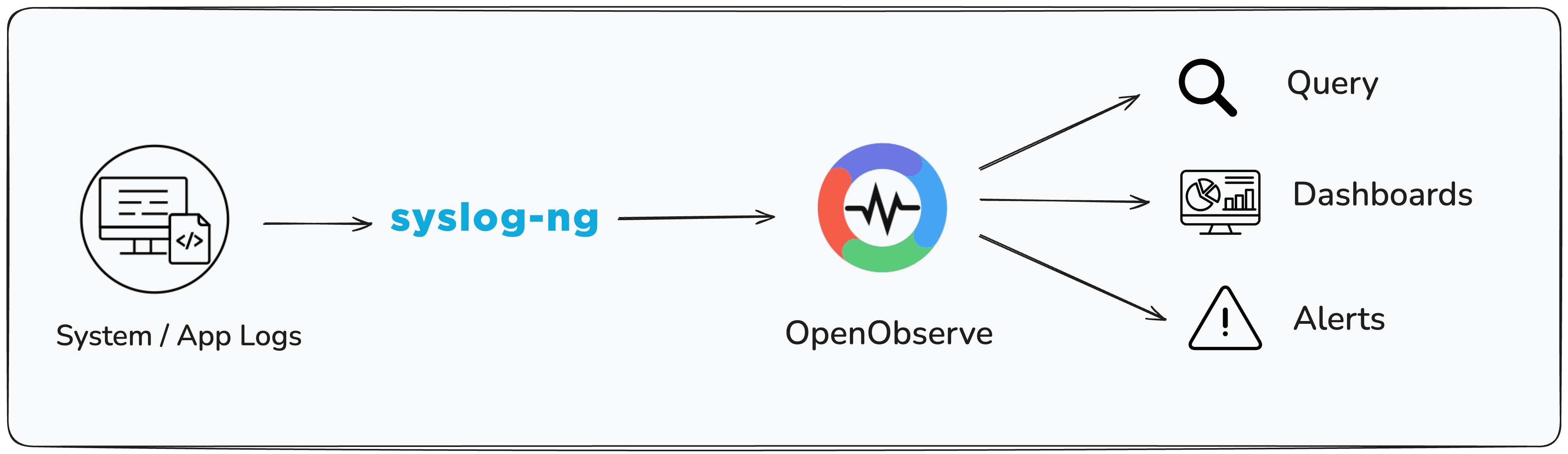
By connecting syslog-ng to OpenObserve, you get a seamless pipeline:
Installation
Syslog-ng needs to be installed on your system before you can forward logs to OpenObserve. It must include support for the http() module, which is used by the openobserve-log() destination.
macOS
On macOS, you can install syslog-ng using Homebrew:
brew install syslog-ng
The Homebrew package already includes the http() module required for OpenObserve integration.
Linux
On Linux, you may need to ensure that the HTTP destination module is installed. This may require enabling additional repositories depending on your distribution.
To verify that the http() module is available, run:
syslog-ng --version | grep http
If you see http listed among the modules, syslog-ng is ready to forward logs to OpenObserve.

For detailed instructions for your operating system and version, refer to the official syslog-ng installation guide: https://www.syslog-ng.com/technical-documents/list/syslog-ng-open-source-edition
The openobserve-log() Destination
syslog-ng comes with an SCL (syslog-ng Configuration Library), which includes prebuilt configuration blocks. One of these is openobserve-log(), a wrapper around the http() destination that makes sending logs to OpenObserve easy.
It automatically constructs the correct ingestion endpoint:
http://<host>:<port>/api/<organization>/<stream>/_json
All you need to specify is:
url("http://<openobserve-host>")(no need to add:<port>in url).organization("default")(or your org name).stream("syslog-ng")(or any custom stream).user()andpassword()(your OpenObserve credentials).
Pre-requisites
Before you begin integrating syslog-ng with OpenObserve, make sure you have the following in place:
- Access to a system with syslog-ng installed with version syslog-ng v4.5.0 or newer (the
openobserve-log()destination was introduced in 4.5) - An OpenObserve account (self-hosted or cloud; sign up at OpenObserve Cloud).
Getting Started
Step 1: Creating Minimal Configuration
Here’s a simple config to get you started. It:
- Reads from a test file (
/tmp/test.log). - Forwards logs to OpenObserve.
- Writes logs locally for verification.
@version: 4.9
@include "scl.conf"

# ---- Source: watch /tmp/test.log ----
source s_test {
    file("/tmp/test.log" follow-freq(1) flags(no-parse));
};

# ---- Destination: OpenObserve ----
destination d_openobserve_http {
    openobserve-log(
        url("https://api.openobserve.ai") # Specify the base URL here
        port("")
        organization("default")
        stream("syslog-ng")
        user("root@example.com")
        password("your-password")
    );
};

# ---- Destination: local file for verification ----
destination d_forwarded {
    file("/tmp/syslog-ng-forwarded.log");
};

# ---- Log path ----
log {
    source(s_test);
    destination(d_forwarded);
    destination(d_openobserve_http);
};
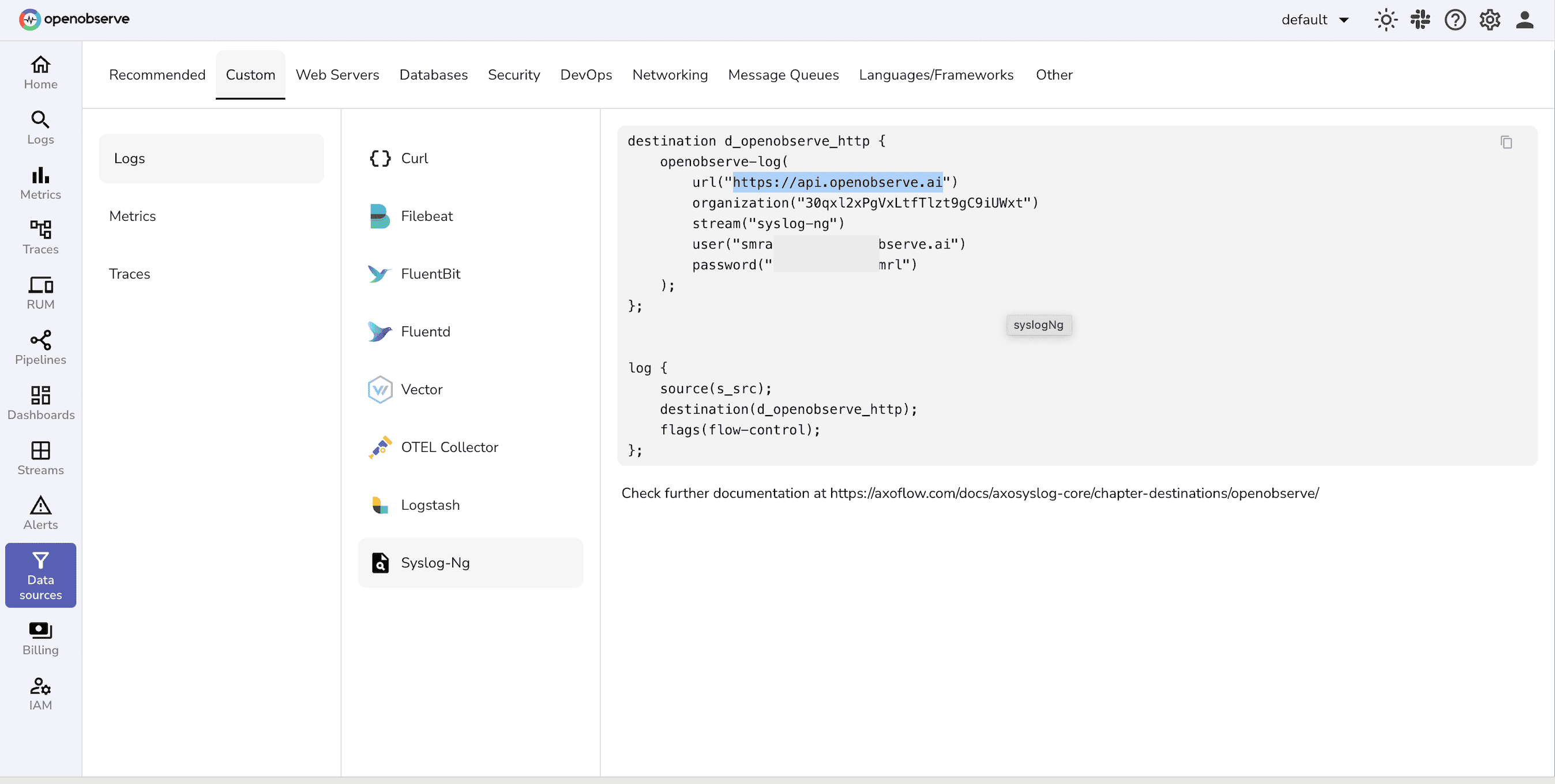
You can find the base URL in the data sources tab:
⚠️ Note on Port Parameter
By default, the openobserve-log() destination appends :5080 to the URL.
- If your OpenObserve is running on another port, you must explicitly set it with the
port()parameter. - For HTTPS on 443, simply set
port(""). - If you leave
port()undefined, it will always use the default 5080.
Step 2: Testing the Setup
Start syslog-ng with the test config:
syslog-ng -F -f /path/to/my-custom.confSend a log line:
echo "Hello OpenObserve from syslog-ng $(date)" >> /tmp/test.logVerify locally:
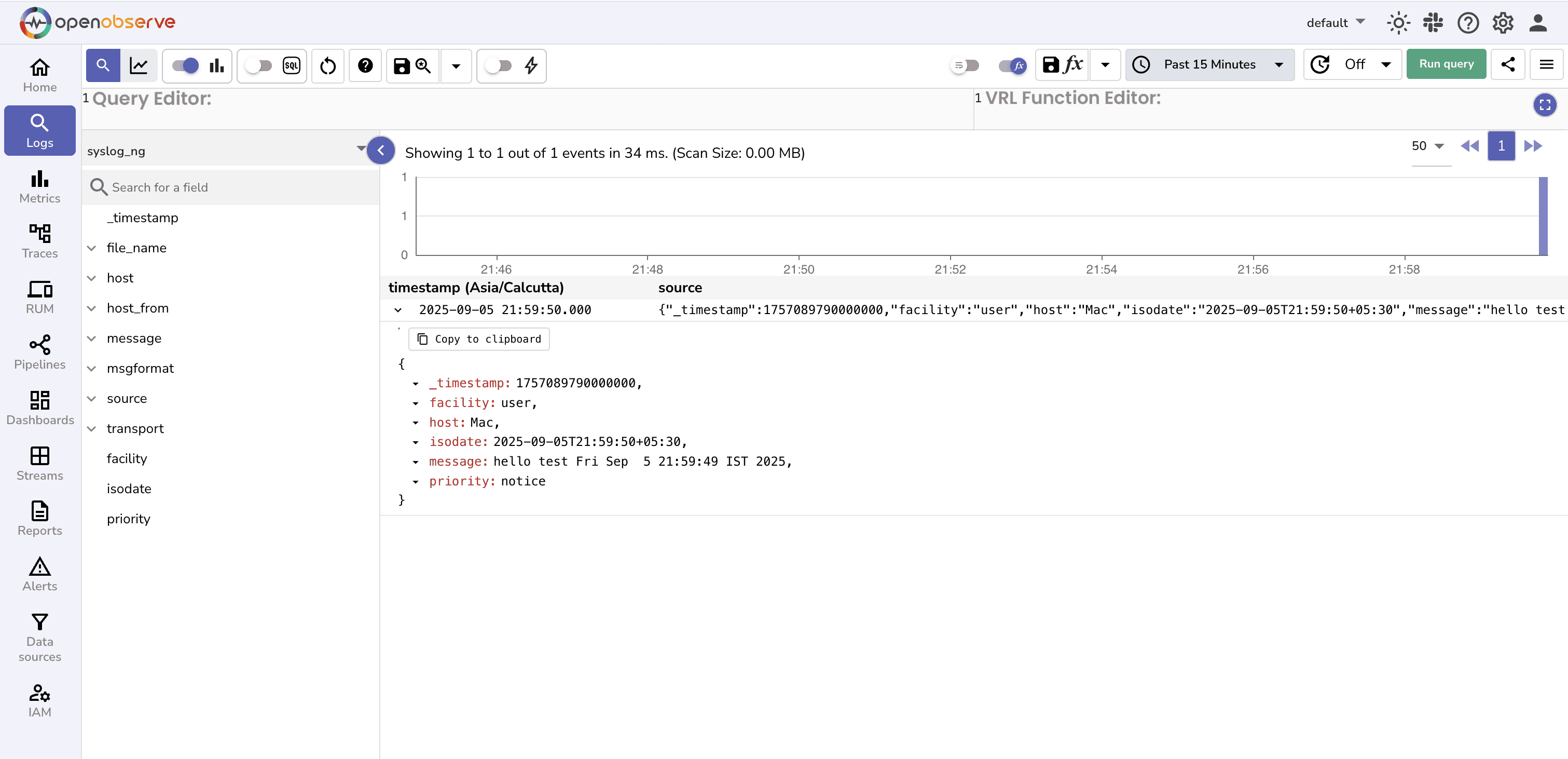
cat /tmp/syslog-ng-forwarded.logQuery in OpenObserve:
- In the OpenObserve UI, go to the Logs tab.
- Select the stream name defined in the configuration file to see the logs
Step 3: Troubleshooting
Double port issue
In case you are using localhost, don’t specify theurl("http://localhost:5080"). Theopenobserve-log()block already appends:5080, so the URL should beurl("http://localhost")Wrong stream/organization
If you can’t query logs in OpenObserve, check that the stream matches your config.Authentication errors
Use correct authentication credentials.Batching delay
During testing, setbatch_lines(1)to flush immediately. For production, increase to reduce overhead.
Step 4: Scaling for Production
For production deployments, tweak the config:
source s_system {
    system();
    internal();
};

destination d_openobserve_http {
    openobserve-log(
        url("http://openobserve.company.internal")
        organization("default")
        stream("syslog-ng")
        user("root@example.com")
        password("your-password")
        workers(4)
        batch_lines(100)
        batch_timeout(1000)
    );
};

log {
    source(s_system);
    destination(d_openobserve_http);
};
- Sources: Collect from system logs, application logs, or even remote syslog sources.
- Batching:
batch_lines(100)andbatch_timeout(1000)ensure logs are sent in batches, reducing HTTP overhead and improving throughput. - Workers:
workers(4)enables concurrent HTTP requests, helping scale for higher log volumes. - Disk buffering: Add reliability using disk-buffer().
FAQs
- Does openobserve-log() require http() in syslog-ng?
Yes,openobserve-log()is an SCL wrapper around http(). - How do I send logs over HTTPS/443?
Useurl("https://...")andport(""). - Why don’t my logs appear in the stream?
Verifyorganization(),stream(), and credentials; check batching/flush settings. - How do I authenticate without a username/password?
You can make use of token instead, which can be initialized using the environment variable:ZO_ROOT_USER_TOKEN - How do I handle TLS certificate errors?
Configure CA bundle or disable verification in test only (not recommended for prod). - Can I use a proxy with the HTTP destination?
If your environment requires routing HTTP traffic through a proxy, syslog-ng’shttp()module supports it via theproxy()option (check your syslog-ng version for support). Check the detailed blog:Using a proxy with the http() destination of syslog-ng guide.
Conclusion
syslog-ng makes it simple to collect logs from diverse sources and forward them in structured JSON format. With the built-in openobserve-log() destination, you can ship logs directly to OpenObserve , no external plugins required.
From there, you get the power of SQL queries, dashboards, and alerting, turning raw logs into actionable insights.
Next steps:
- Create dashboards in OpenObserve for authentication logs, kernel messages, or application-specific events.
- Set up alerts to detect anomalies in syslog streams.
With syslog-ng and OpenObserve, your logging pipeline becomes both flexible and observable.
Ready to Get More from Your Logs, Metrics, and Traces?
- Sign up for a 14-day free Cloud trial and integrate your metrics, logs, and traces into one powerful platform to boost your operational efficiency and enable smarter, faster decision-making.
- Get an OpenObserve Demo
Happy Monitoring !!
About the Author
Simran Kumari

Passionate about observability, AI systems, and cloud-native tools. All in on DevOps and improving the developer experience.
Follow OpenObserve on Google
Add OpenObserve as a preferred source to see more of our articles in Google Search and Top Stories.