
DataDog vs OpenObserve Part 4: Dashboards - Prebuilt, Drag & Drop, Custom Visualizations, Up to 98% Cost Savings

Manas Sharma
January 09, 2026
11 min read
Don’t forget to share!



Try OpenObserve Cloud today for more efficient and performant observability.
Get Started For Free
Your DataDog bill jumped 40% last month. Again. You didn't change anything significant, yet costs escalated. Now you're choosing between full observability and budget predictability.
This is the reality for teams using DataDog: multi-dimensional pricing (hosts, custom metrics, indexed spans, feature tiers) makes cost forecasting nearly impossible. The fundamental question shifts from "what should we monitor?" to "what can we afford to monitor?" Engineers hesitate before adding instrumentation. Architects design around billing optimization, not operational needs.
This hands-on comparison tests DataDog and OpenObserve as OpenTelemetry-native observability platforms, sending identical production-like data to both platforms simultaneously. The results show how these platforms handle dashboard creation, custom visualizations, and operational flexibility with the same production-like data.
OpenObserve transforms the fundamental question from "can we afford to monitor this?" to "what do we need to monitor?" The platform provides comprehensive system visibility without cost-driven compromises.
This is Part 4 in a series comparing DataDog and OpenObserve for observability (security use cases excluded):
We built monitoring dashboards covering standard scenarios: container CPU utilization, PostgreSQL metrics, host metrics, request rates, error rates, and latency percentiles using the OpenTelemetry Astronomy Shop demo.
All services were instrumented with OpenTelemetry SDKs sending logs, metrics, and traces to the OTel Collector, which exported to both DataDog and OpenObserve simultaneously. Same data, same timestamps, same volumes.
Creating operational dashboards requires balancing simplicity for common cases with flexibility for complex analysis.
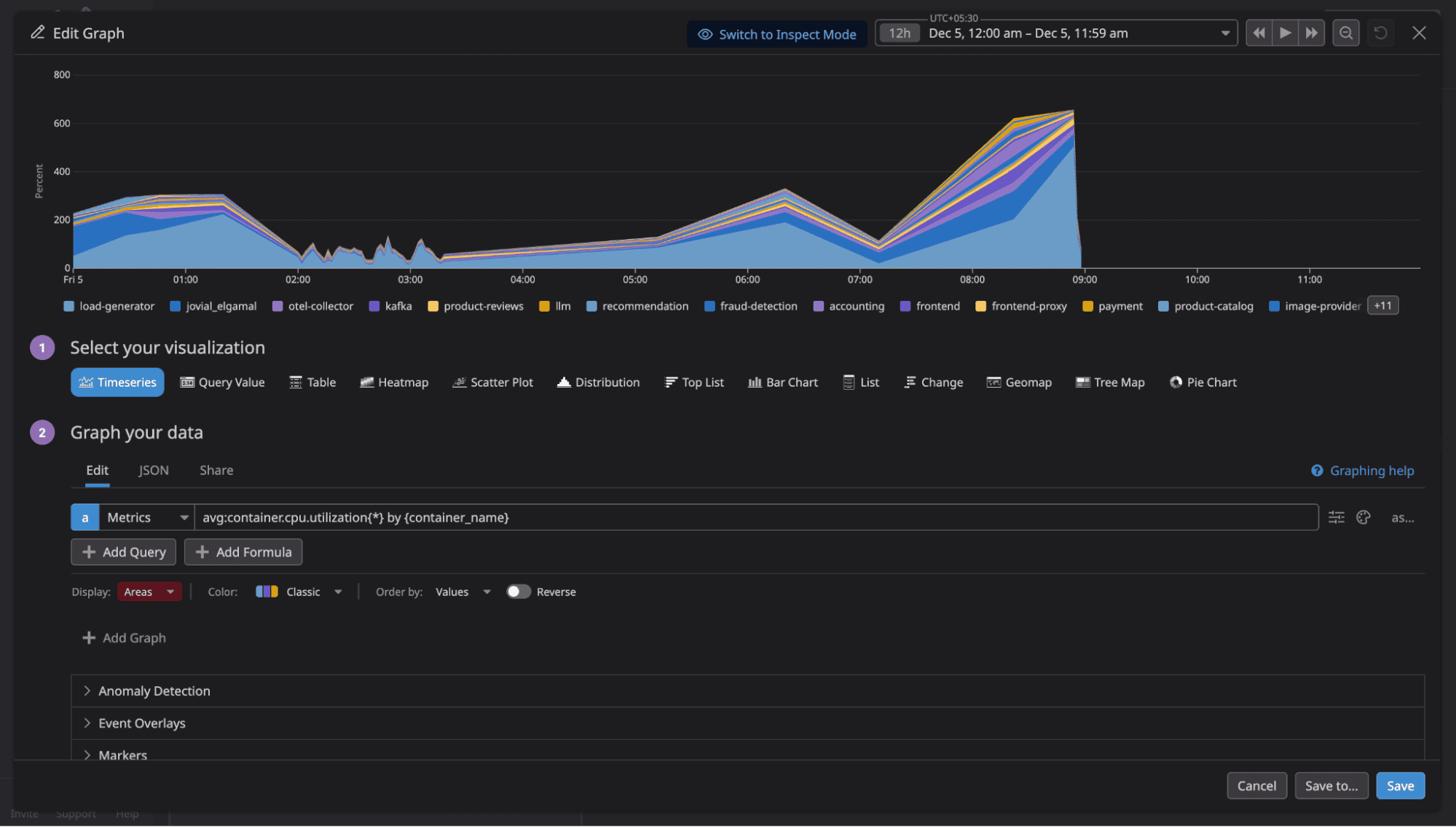
DataDog offers drag-and-drop widgets, extensive visualizations (timeseries, heatmaps, top lists), and pre-built templates. The UI is polished. After selecting a widget type, you can either build the panel through UI interactions (dropdowns, buttons) or write queries yourself using DataDog's proprietary syntax.
OpenObserve provides two modes for dashboard creation:
Builder (auto mode): Intuitive UI controls for basic visualizations. Add axis, filters, variables, and aggregations through dropdown menus. Drag-and-drop simplicity for standard monitoring scenarios.
Custom mode: Write SQL or PromQL queries for complex analysis. Full query language power when you need joins, subqueries, window functions, or advanced aggregations.
You can switch between modes for the same panel. Start with Builder for quick setup, switch to Custom when you need query complexity.
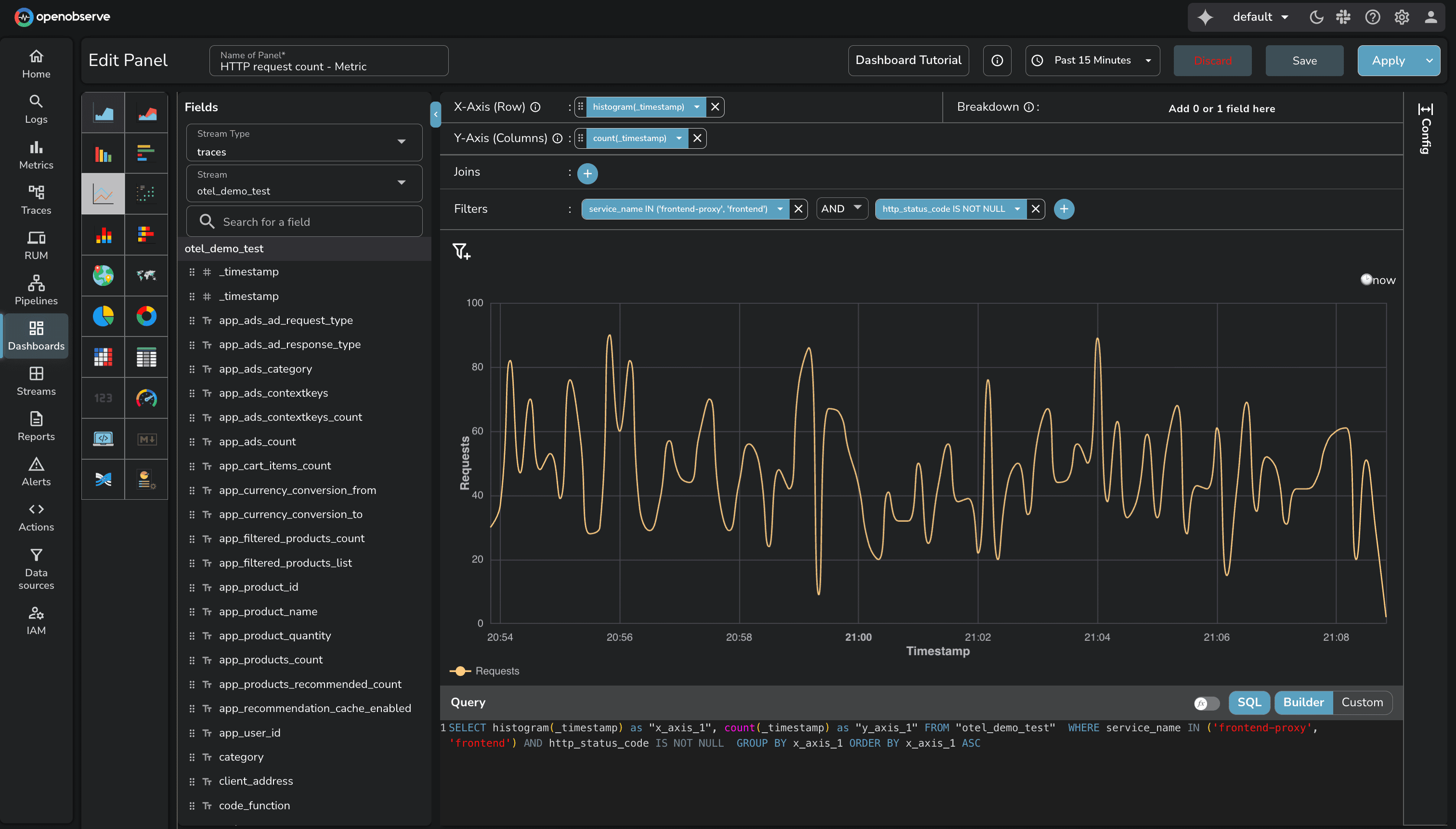
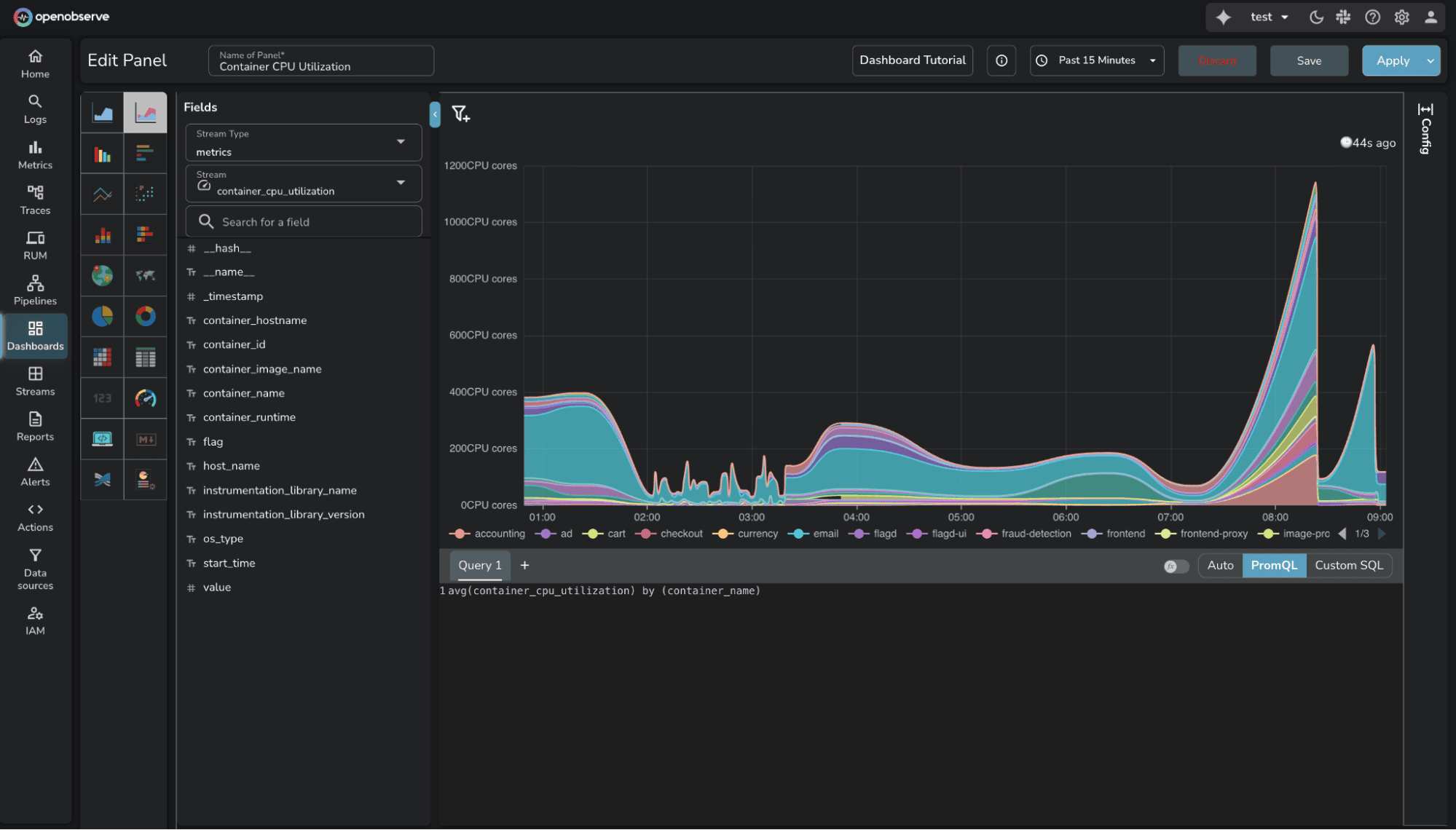
The key difference: OpenObserve supports SQL and PromQL (industry standards) for custom queries, while DataDog requires learning proprietary syntax. For teams already using Prometheus or familiar with SQL, OpenObserve removes the query language learning curve.
Both platforms deliver what teams need for operational visibility. The difference is query flexibility and cost structure.
Available in Enterprise Edition and OpenObserve Cloud.
Standard chart types (timeseries, bar charts, pie charts) cover most monitoring scenarios. But specialized use cases require custom visualizations: network topology maps, sankey diagrams, gauge clusters, heatmap calendars, or domain-specific visual representations.
OpenObserve Custom Charts let you create visualizations by using SQL to query the data and JavaScript to define how the chart appears. Custom Charts are powered by Apache ECharts, giving you access to 100+ chart examples and the full ECharts API.
The workflow is straightforward:
DataDog provides two approaches for custom visualizations:
Source: DataDog UI Extensions
Source: DataDog Wildcard Widget
The comparison:
For teams needing custom visualizations without complex development workflows, OpenObserve's approach is more direct.
Pre-built dashboards accelerate initial setup. Instead of building monitoring from scratch, start with proven templates for common use cases.
OpenObserve Community Dashboards, the library is community-driven: users contribute dashboards for common infrastructure and application scenarios.
The library covers:
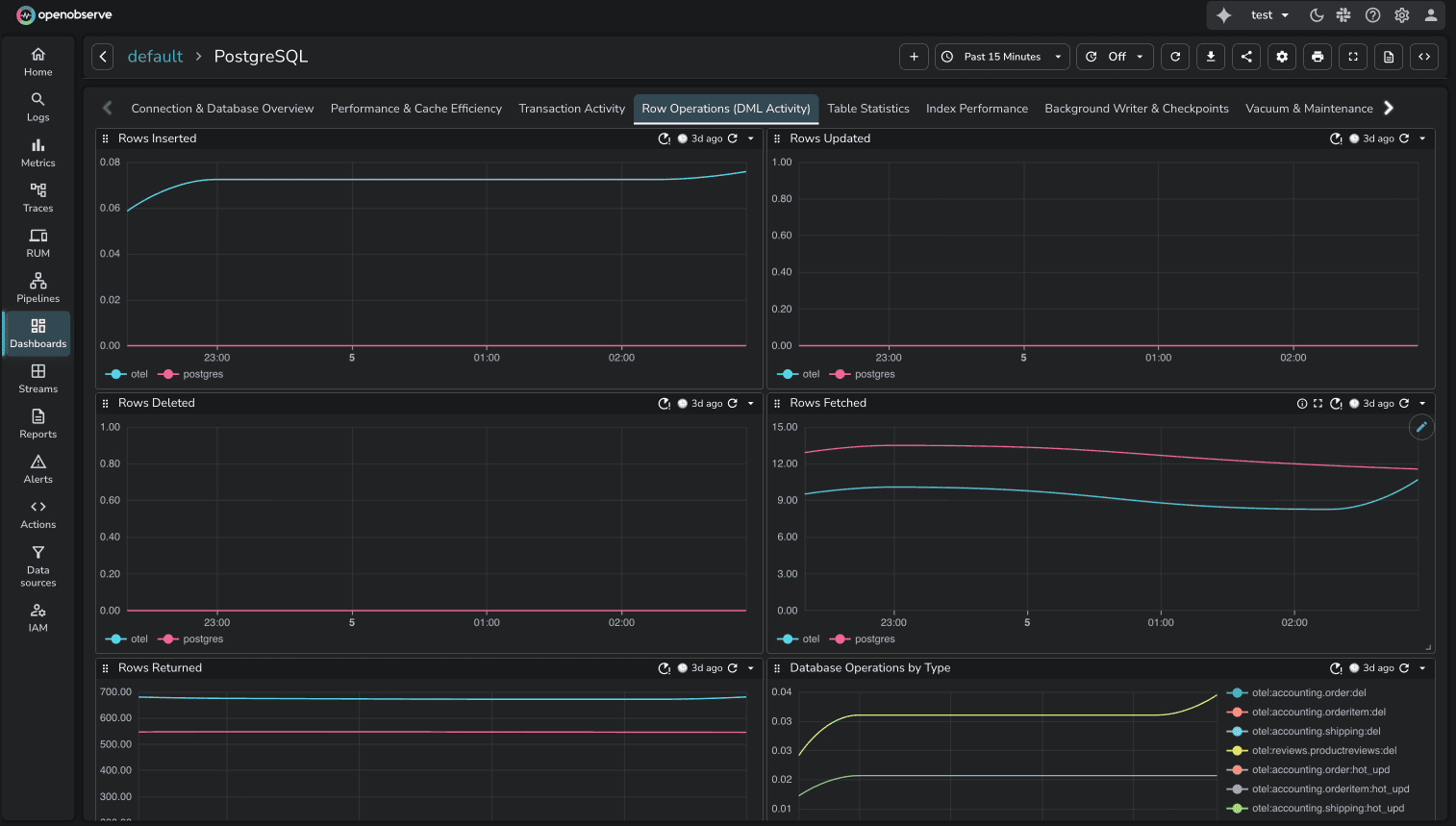
The community model means dashboards reflect real production use cases. Anyone can contribute dashboards for tools they monitor.
DataDog provides integration dashboards tied to specific integrations. When you install an integration (PostgreSQL, Kubernetes, etc.), DataDog includes out-of-the-box dashboards automatically. For example, the PostgreSQL integration includes "Postgres - Metrics" and "Postgres - Overview" dashboards.
The comparison:
Both approaches deliver pre-built dashboards. DataDog's are vendor-controlled. OpenObserve's are community-maintained and freely accessible.
Static dashboards show fixed data. Dynamic dashboards adapt to user selections through variables: filters that adjust what data is displayed without editing queries.
OpenObserve Variables enable interactive filtering. Define variables like $service, $region, or $environment, and users select values through dropdowns. All panels using those variables update automatically.
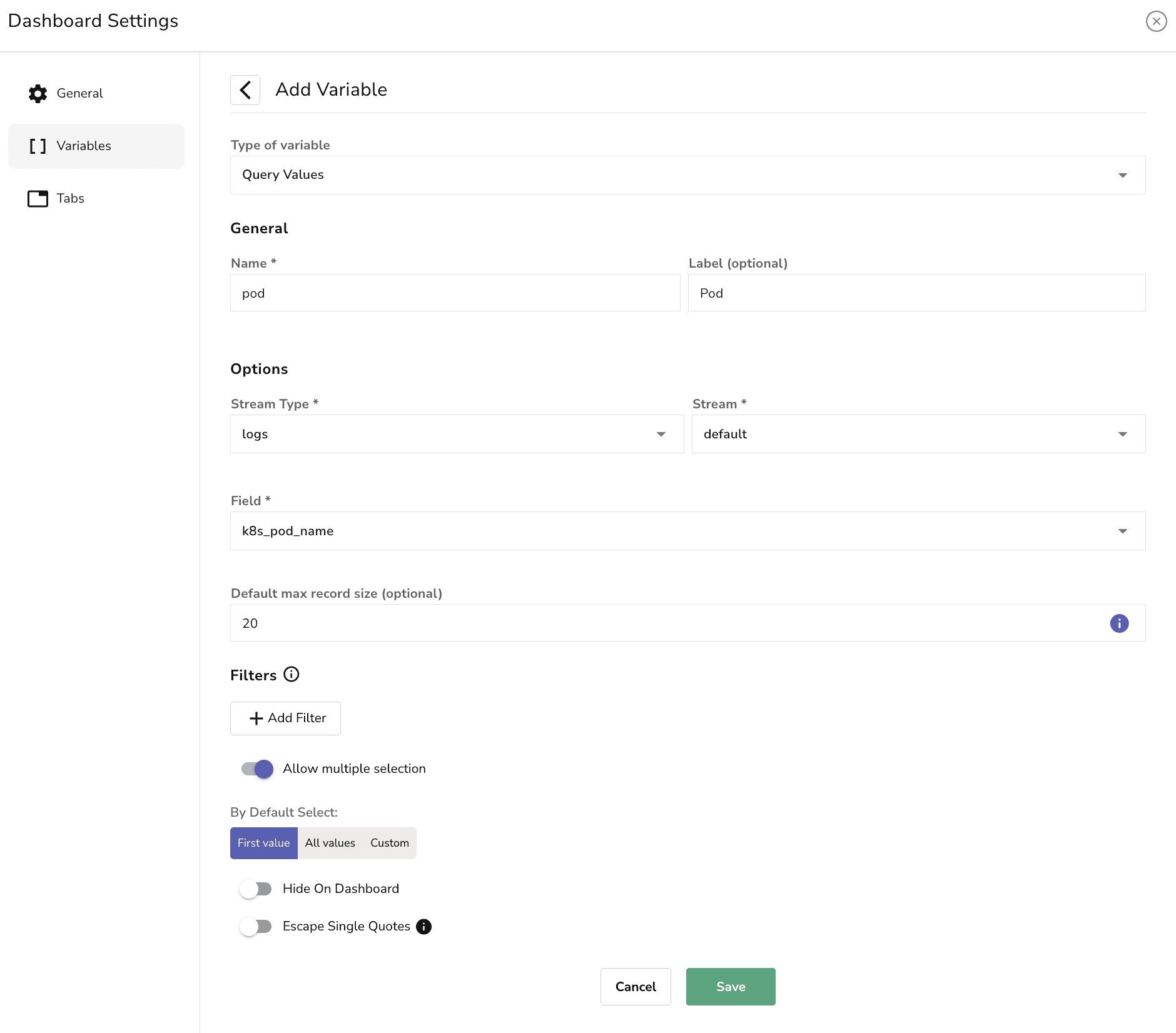
Use variables to:
DataDog Template Variables provide the same functionality. Select values through dropdowns to filter data across dashboard widgets without manually editing queries.
Source: DataDog Template Variables
Feature parity. Both platforms handle interactive dashboard filtering effectively.
OpenObserve Variable Dependencies allow parent-child relationships between variables. When a user selects a value for the parent variable, the child variable updates to show only relevant options associated with that selection.
This is useful for hierarchical data: Kubernetes resources (namespace → deployment → pod) or application modules (region → cluster → service).
DataDog Associated Template Variables provide automatic cascading. DataDog automatically finds associated values for other template variables as you make selections. When you select a namespace, the deployment dropdown shows only deployments in that namespace. No additional setup required.
Source: DataDog Associated Template Variables
Feature parity. DataDog's approach is automatic. OpenObserve's allows explicit parent-child modeling.
OpenObserve Comparison Against allows you to visually compare current data with data from a selected point in time in the past. Useful for trend analysis and identifying patterns over time.
Example: Compare error trends for the last 15 minutes today with error trends for the same time period 2 days ago.
DataDog timeshift function enables temporal data comparison. Overlay current metrics against historical data from previous time periods. Accessible through the dashboard query builder when configuring widgets.
Source: DataDog Timeshift Function
Feature parity. Both platforms support time-shift comparison for trend analysis.
Modern applications integrate AI features: product recommendations, chat interfaces, content generation. These make API calls to LLM providers (OpenAI, Anthropic, Cohere, or self-hosted). Observability platforms need dashboards showing LLM performance: token usage, latency, error rates, costs per request.
In DataDog, LLM traces automatically activate LLM Observability, a premium feature. The cost: $120 per day. This activation happens automatically when DataDog detects LLM span attributes.
Source: See Part 3: Traces/APM for detailed LLM observability comparison
In OpenObserve, LLM traces are standard traces. No special classification. No premium pricing. The flat $0.30/GB rate applies to all observability data.
OpenObserve proivde pre-built LLM observability dashboards through OpenLIT integration. The OpenLIT LLM Observability dashboard visualizes token usage, latency distributions, model performance, and cost tracking across LLM providers.
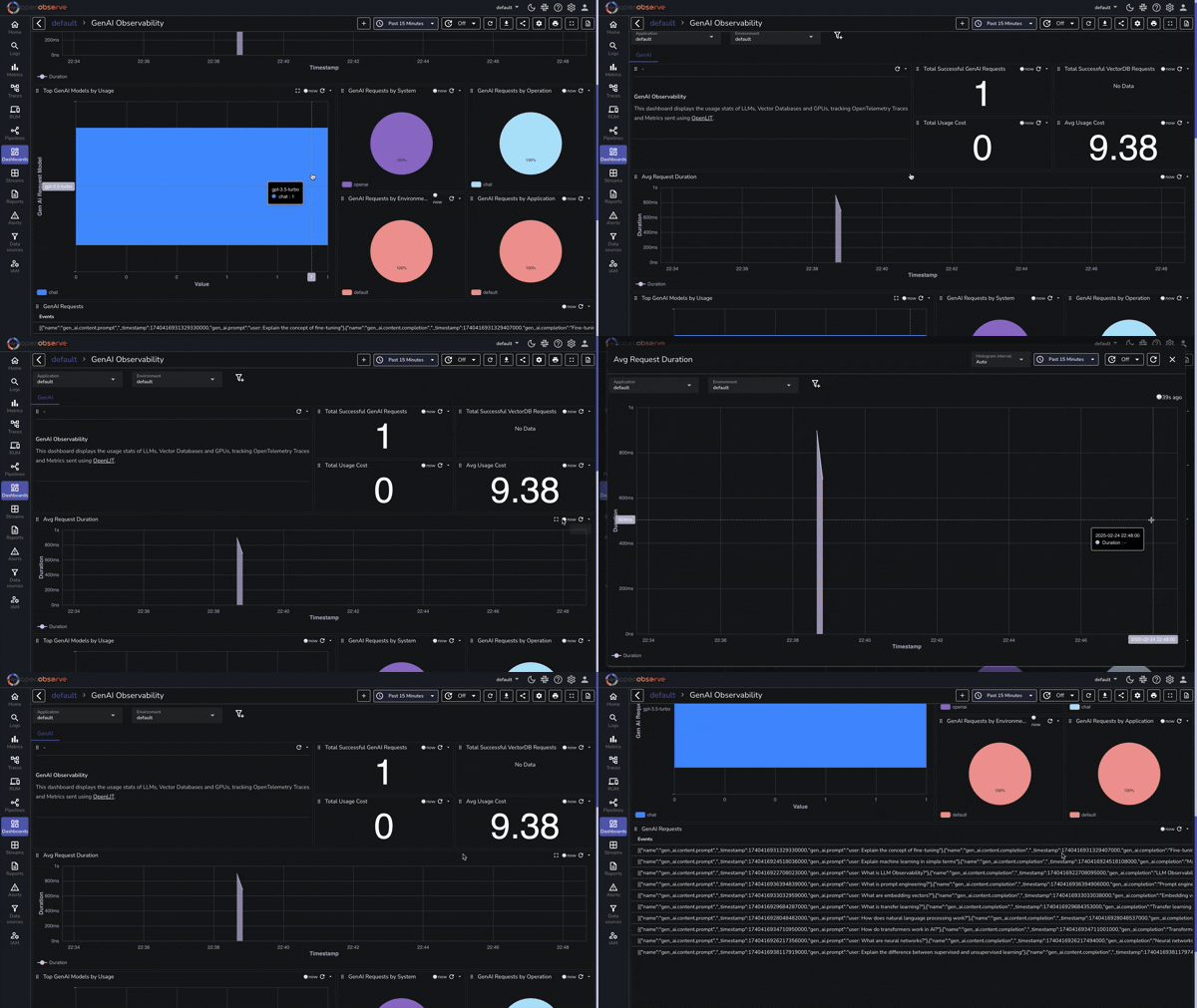
Adding AI features to your application doesn't add $3,600/month in observability costs with OpenObserve. It adds data volume at the same $0.30/GB rate.
| Capability | DataDog | OpenObserve |
|---|---|---|
| Dashboard Creation | Drag-drop widgets with proprietary query syntax | Builder (auto) + Custom mode (SQL/PromQL) |
| Custom Visualizations | UI Extensions (React/TypeScript dev) OR Wildcard (Vega-Lite) | Custom Charts: SQL + JavaScript + ECharts (Enterprise) |
| Pre-built Dashboards | Vendor-provided integration dashboards | Community-driven GitHub library |
| Variables | Template Variables | Variables (interactive filtering) |
| Variable Dependencies | Associated Values (automatic cascading) | Variable Dependencies (explicit parent-child) |
| Time-shift Comparison | timeshift() function | Comparison Against |
| LLM Observability | $120/day premium tier (auto-activated) | Standard pricing ($0.30/GB flat) |
| Query Language | Proprietary syntax | SQL + PromQL (industry standards) |
| Total Test Cost | $174/day (all observability: LLM $120 + APM $36 + Infrastructure $18) | $3.00/day (all observability) |
Dashboards themselves don't have per-dashboard pricing in either platform. The cost difference comes from the underlying data: DataDog's multi-dimensional pricing (per-host charges, indexed spans, premium feature tiers) versus OpenObserve's flat $0.30/GB for all observability data.
In the test environment running the 16-service OpenTelemetry demo application with Kafka, PostgreSQL, Valkey, and LLM services:
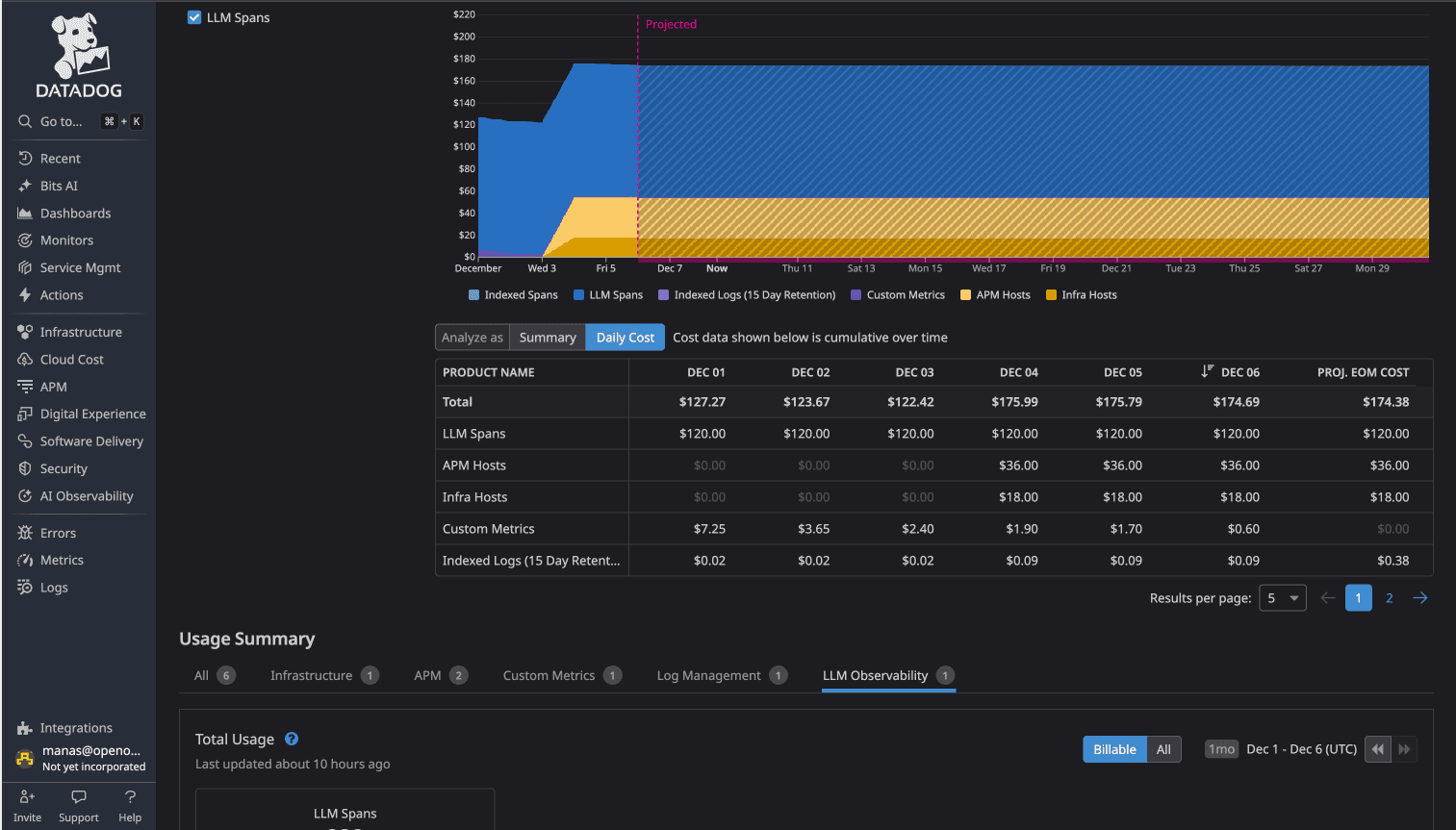
DataDog Total: $174/day
OpenObserve Total: $3.00/day
The cost difference: 58x (more than 98% cost savings)
The same dashboards visualizing the same data cost 58 times more to operate in DataDog due to the underlying pricing model.
OpenObserve's OpenTelemetry-native architecture means you instrument once with industry-standard OTel SDKs, export to OpenObserve, and build dashboards without vendor lock-in. No proprietary agents. No feature-based pricing tiers. No automatic premium charges when you add AI features.
DataDog provides polished dashboard capabilities with extensive integrations. If you're already invested in the DataDog ecosystem and cost isn't a primary concern, the dashboards work.
But if you're evaluating observability platforms or open-source DataDog alternatives for dashboards, OpenObserve delivers the same core visualization capabilities with significant advantages:
For platform engineers managing OpenTelemetry-instrumented microservices, these differences matter. No cost anxiety about adding AI features. More query flexibility with SQL and PromQL. Transparent pricing that scales predictably.
This is Part 4 in a series comparing DataDog and OpenObserve for observability (security use cases excluded):
Sign up for a free cloud trial or schedule a demo to test OpenObserve dashboards with your observability data.

Manas is a passionate Dev and Cloud Advocate with a strong focus on cloud-native technologies, including observability, cloud, kubernetes, and opensource. building bridges between tech and community.