


LLM Evaluations
Online Evaluations let you continuously score your LLM application's traces and spans using configurable evaluators - either LLM-as-a-judge powered by your own AI providers, or external remote scoring endpoints.
Overview
The Online Evaluations system has four core resources, each building on the previous:
| Resource | What it does |
|---|---|
| Provider | An LLM API configuration (OpenAI, Anthropic, etc.) with credentials and available models. Used by LLM Judge scorers to call an LLM. |
| Score Config | Defines the shape of a score - its data type (numeric, categorical, boolean), valid range or categories, and a healthy/unhealthy threshold. |
| Scorer | The evaluation logic: a template with {{variables}}, parameters for execution, and a link to a score config that describes the output it produces. Two types exist: LLM Judge (calls an LLM via a provider) and Remote (calls an external HTTP endpoint). |
| Eval Job | A running evaluation pipeline: binds one or more scorers to a specific stream, defines a target scope (span, trace, or session), which traces/spans to evaluate (filter), how many to sample, and manages the lifecycle (draft, active, paused, archived). |
When you activate an eval job, the system creates a system-managed evaluation pipeline that runs your scorers against incoming data. Scores flow into the _llm_scores stream; evaluator telemetry flows into the _evaluator traces stream.
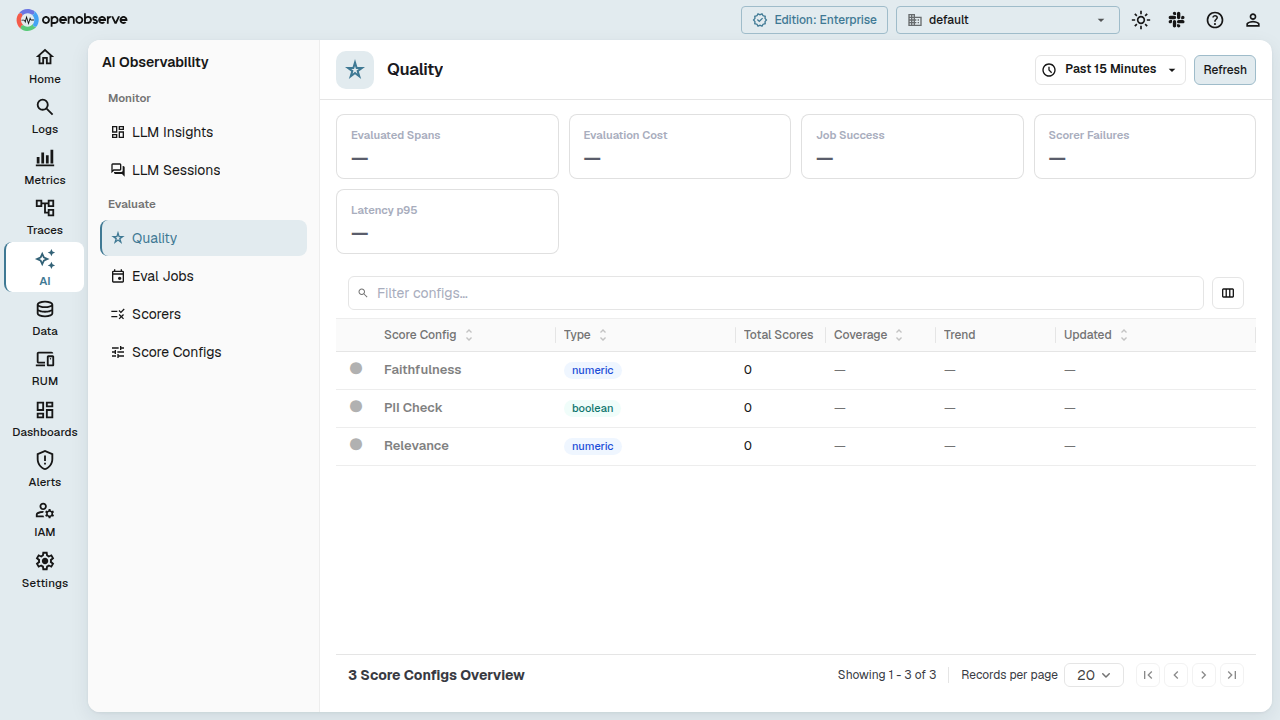
Enable Online Evaluations
Online Evaluations is an enterprise feature. Set the configuration flag to enable it:
When enabled, the Evaluations top-level navigation appears in the UI. When disabled, all evaluation pages and settings are hidden; backend API endpoints remain reachable.
Providers
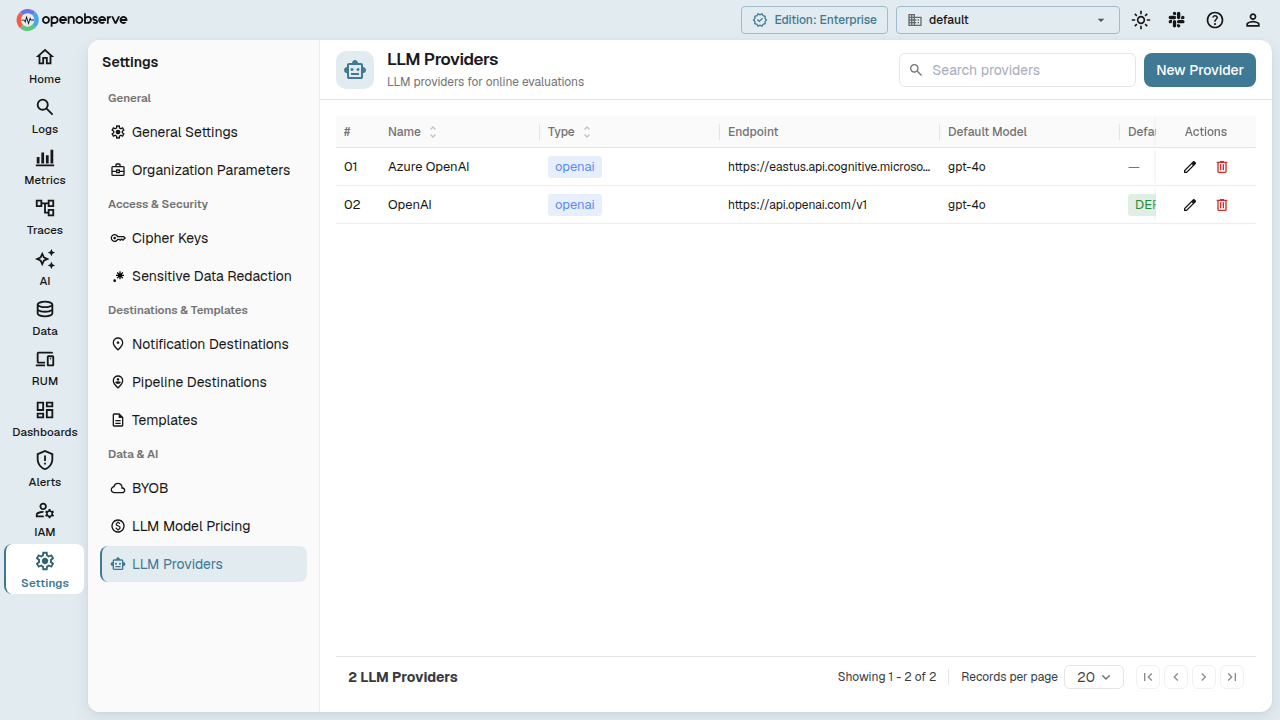
A Provider stores the connection details for an LLM API. You configure one provider per AI service you want your LLM Judge scorers to use.
Create a provider
Navigate to Evaluations > Providers and click Add Provider.
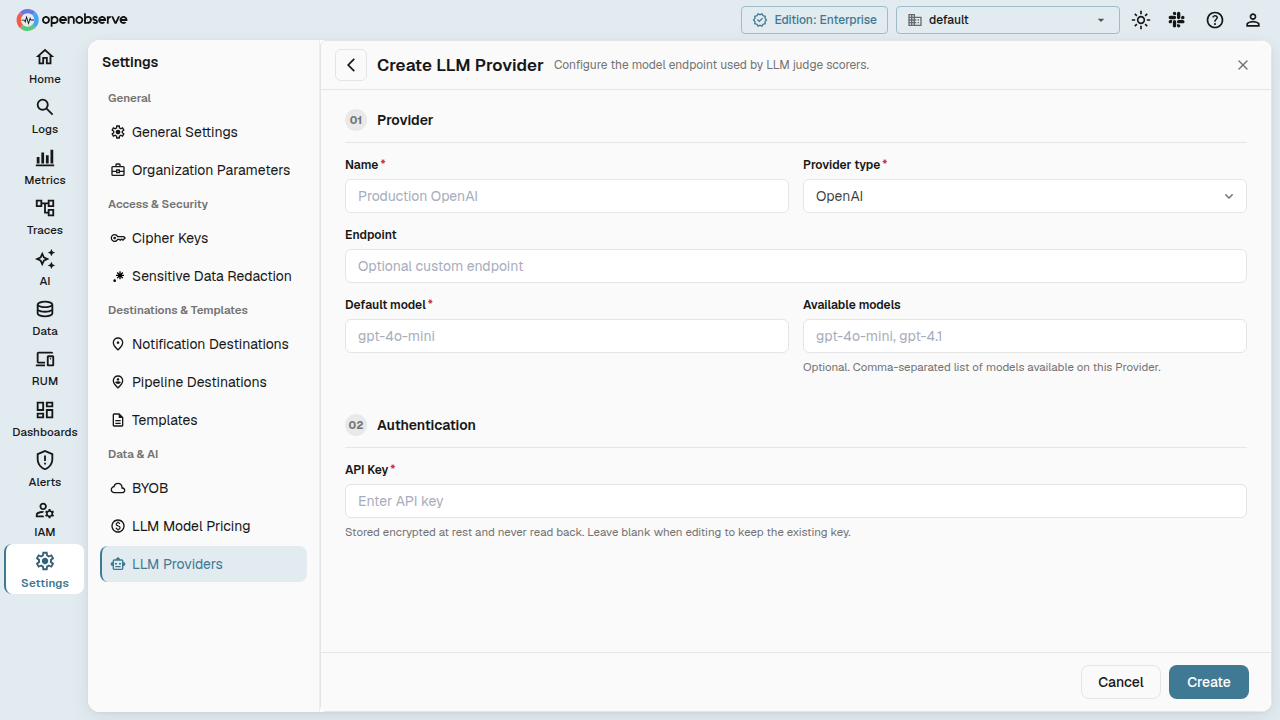
| Field | Description |
|---|---|
| Name | Display name for the provider. |
| Provider Type | The provider kind (openai, anthropic, azure, gemini, etc.). Determines the API protocol. |
| Endpoint | Override the default API base URL. Leave empty to use the provider's standard endpoint. |
| Default Model | The model used when no model is specified on the scorer. |
| Available Models | List of model IDs this provider supports. Used for model selection in scorers. |
| Auth Config | Credentials in JSON format (e.g., {"api_key": "sk-..."}). Masked in API responses. |
| Is Default | When set, this provider is preselected when creating new LLM Judge scorers. |
Test a provider
From the provider detail page, use the Test button to verify connectivity. The system sends a test request using the configured endpoint and credentials.
Manage providers
- Update: Edit any field. The provider is updated in-place.
- Delete: Removes the provider. Scorers referencing a deleted provider will fail until reassigned.
Score Configs
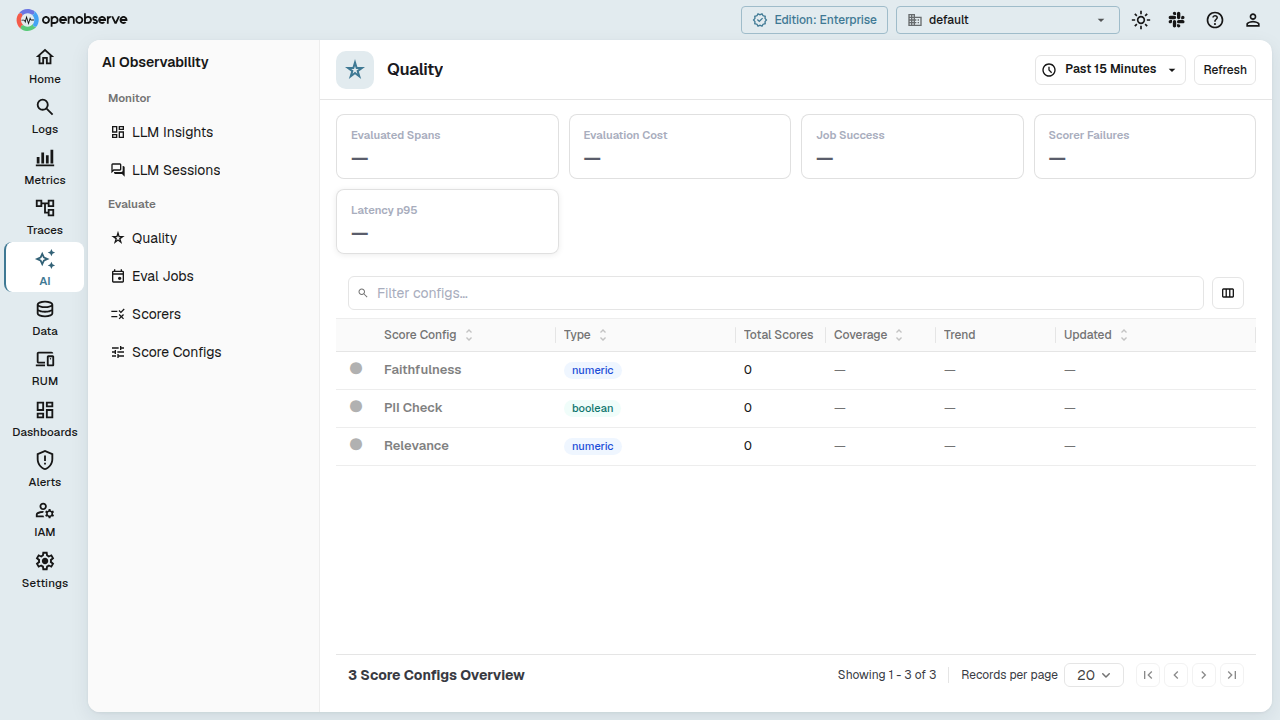
A Score Config describes what a score looks like and when it is considered healthy.
Create a score config
Navigate to Evaluations > Score Configs and click Add Score Config.
| Field | Description |
|---|---|
| Name | A label for this config (e.g., "Faithfulness", "Accuracy"). |
| Data Type | numeric, categorical, or boolean - the type of score value. |
| Description | Optional description of what the score measures. |
| Numeric Range | For numeric scores: {"min": 0.0, "max": 1.0}. |
| Categories | For categorical scores: a list of valid category labels. |
| Healthy Threshold | Defines the boundary for healthy scores (e.g., {"direction": "gte", "value": 0.7} means scores ≥ 0.7 are healthy). |
Versioning
Score configs are versioned. Each config has a stable entity ID that stays the same across versions, and a unique ID per version. Updating a score config creates a new version and bumps the version number. Scorers that reference a score config can pin to a specific version or always use the latest.
Scorers
A Scorer is the executable evaluation unit. It contains a prompt template with {{variable}} placeholders, execution parameters, and an optional link to a score config that describes its output.
Scorer types
- LLM Judge: Sends the rendered template to an LLM via a configured provider. Supports temperature, max tokens, timeout, output parsing, and optional reasoning.
- Remote: Sends the rendered template as an HTTP request to an external evaluation service. Supports bearer token auth, API keys, basic auth, custom headers, timeouts, and retries.
Create a scorer
Navigate to Evaluations > Scorers and click Add Scorer.
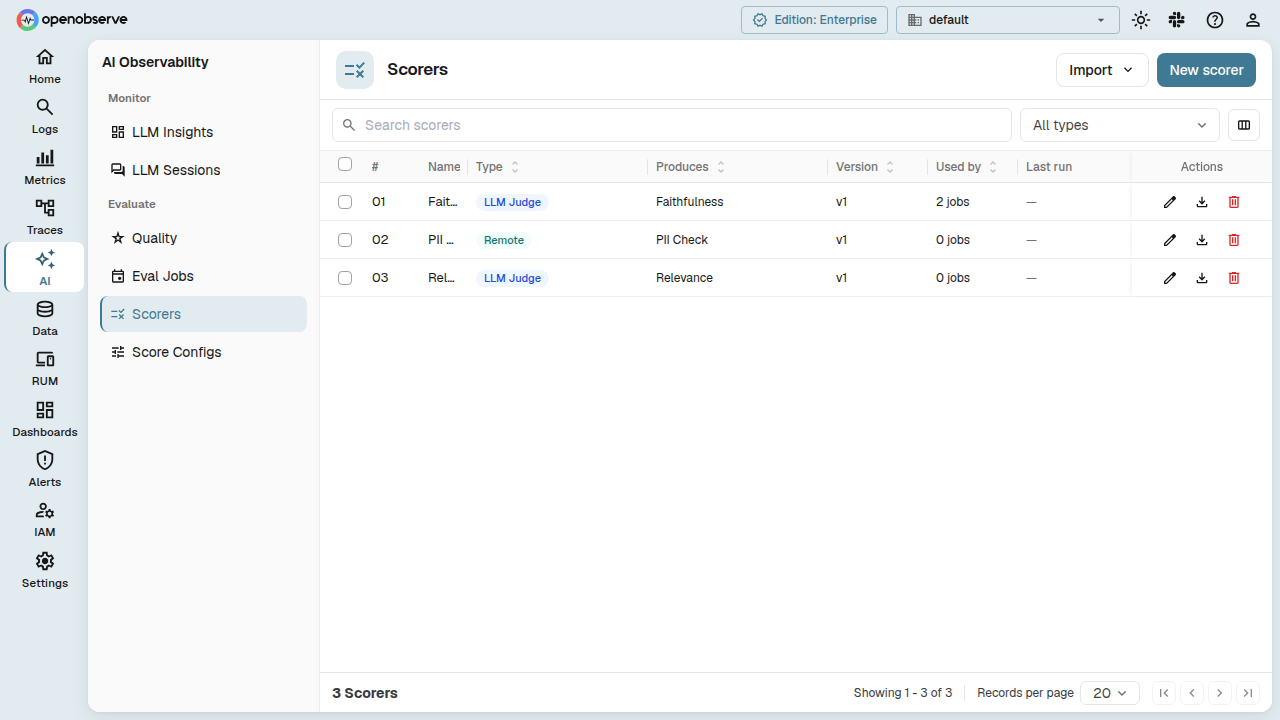
| Field | Description |
|---|---|
| Name | Display name. |
| Description | Optional description. |
| Scorer Type | Choose LLM Judge or Remote. |
| Produces Score Config | (Optional) Link to a score config that describes this scorer's output. |
| Template | The evaluation prompt with {{variable}} placeholders that will be populated at runtime. |
| Output Schema | (LLM Judge only) JSON Schema for structured output parsing. |
For LLM Judge, you also configure:
| Field | Description |
|---|---|
| Provider | The provider to use for the LLM call. |
| Model | Override the provider's default model. |
| Temperature | LLM temperature (0-2). |
| Max Tokens | Maximum completion tokens. |
| Timeout | Request timeout in milliseconds. |
| Include Reasoning | When enabled, the LLM is prompted to include reasoning alongside the score. |
| Extra Metadata Fields | Additional fields the LLM should return beyond the score (e.g., failure mode classification). |
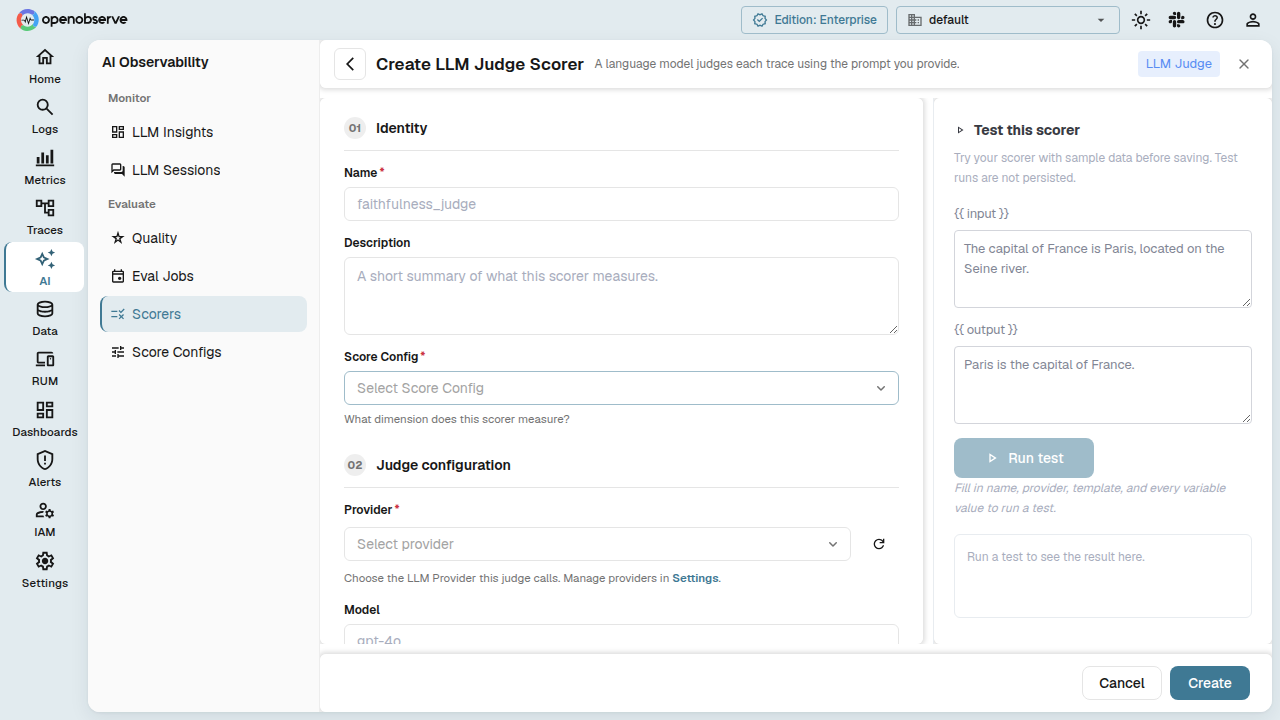
For Remote, you configure:
| Field | Description |
|---|---|
| Endpoint | The URL of the remote scoring service. |
| HTTP Method | POST or PUT. |
| Auth | none, bearer (token), basic (username/password), or api_key (token + header name). |
| Custom Headers | Additional HTTP headers to send. |
| Content Type | Request content type (defaults to application/json). |
| Timeout | Request timeout in milliseconds. |
| Max Retries | Number of retry attempts on failure. |
Test a scorer
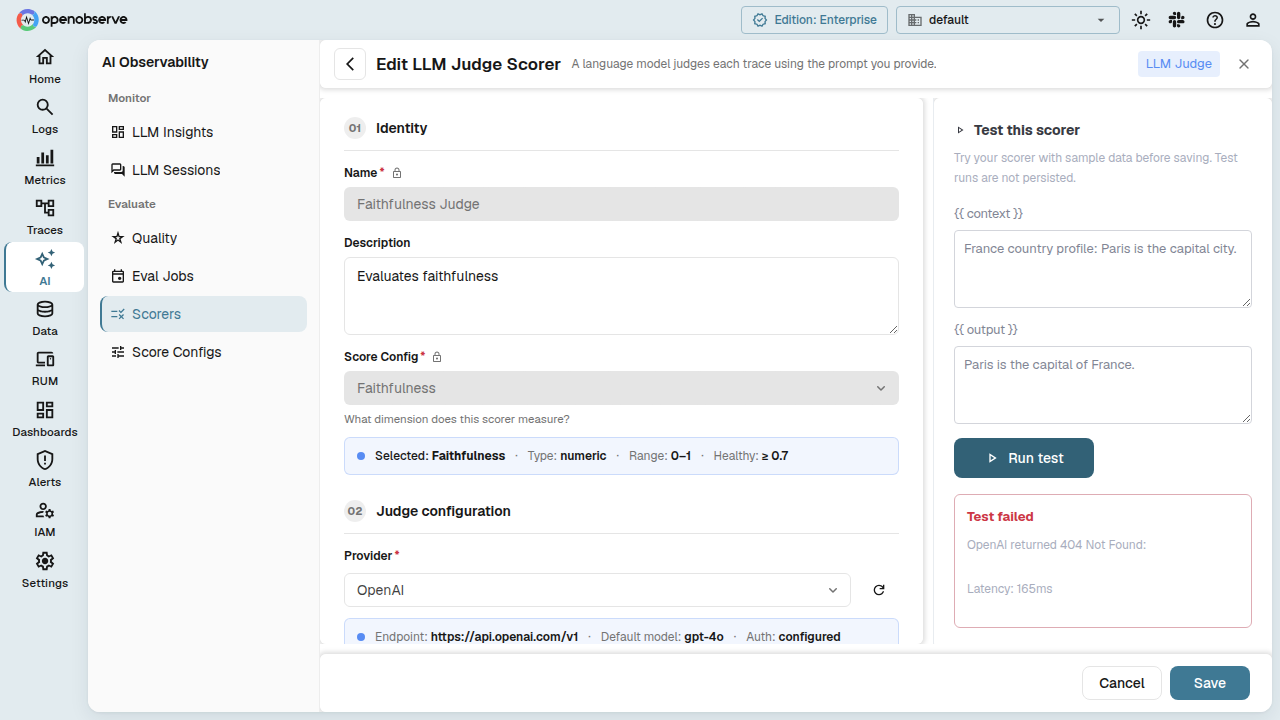
From the scorer detail page, use the Test button. Provide values for the template variables, and the system executes a one-off evaluation. The response shows the score, reasoning, model used, latency, and token usage.
Preview output schema
For LLM Judge scorers, the Preview Schema endpoint shows the derived output schema based on the score config and extra metadata fields, helping you understand what structure the LLM will return.
Versioning
Like score configs, scorers are versioned. Each scorer has a stable entity ID and a version number. Updating a scorer creates a new version. Eval jobs can reference a scorer by entity ID (always latest) or pin to a specific version.
Eval Jobs
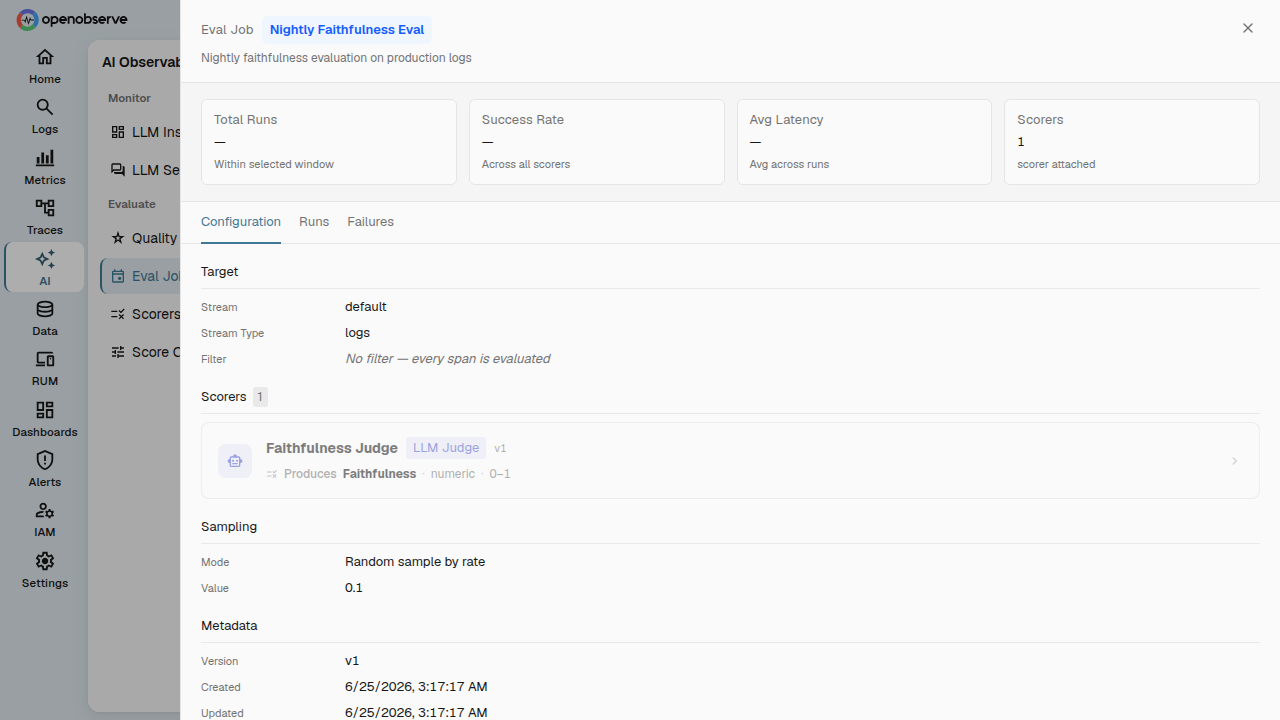
An Eval Job is the execution unit that runs scorers against incoming traces. Each job defines a target scope — the granularity at which scoring runs: individual spans, entire traces, or full sessions.
Create a job
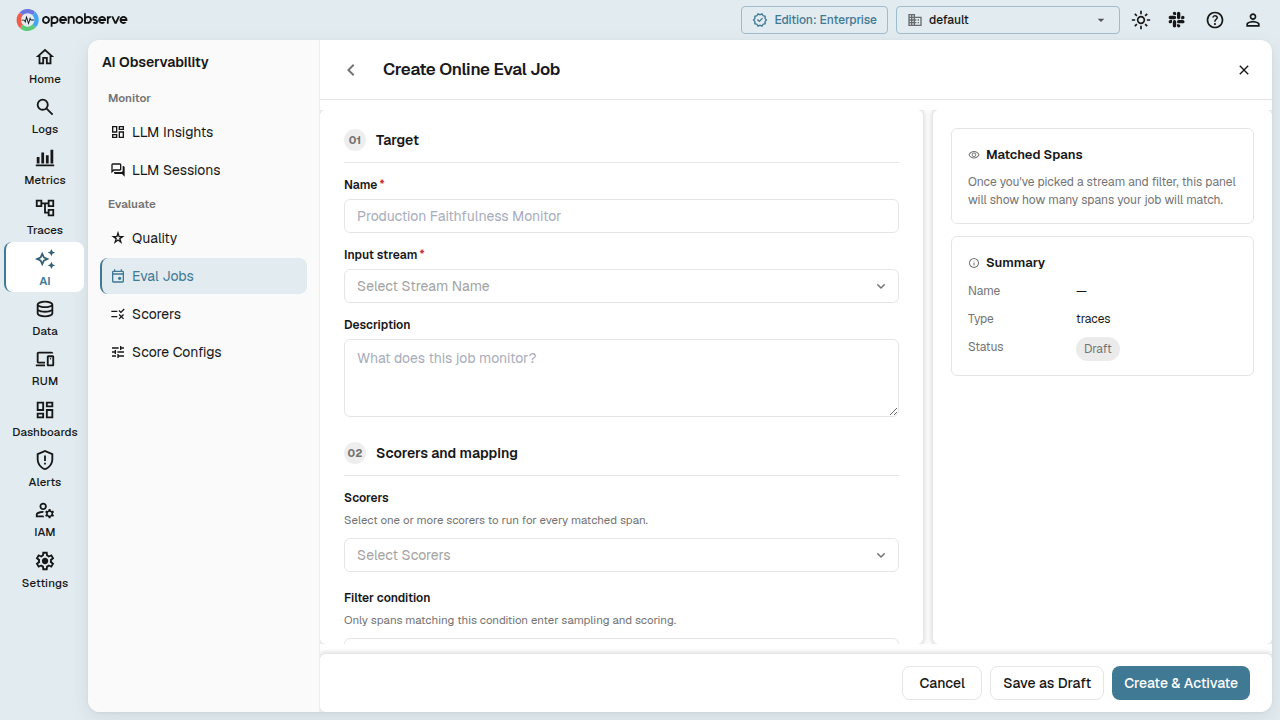
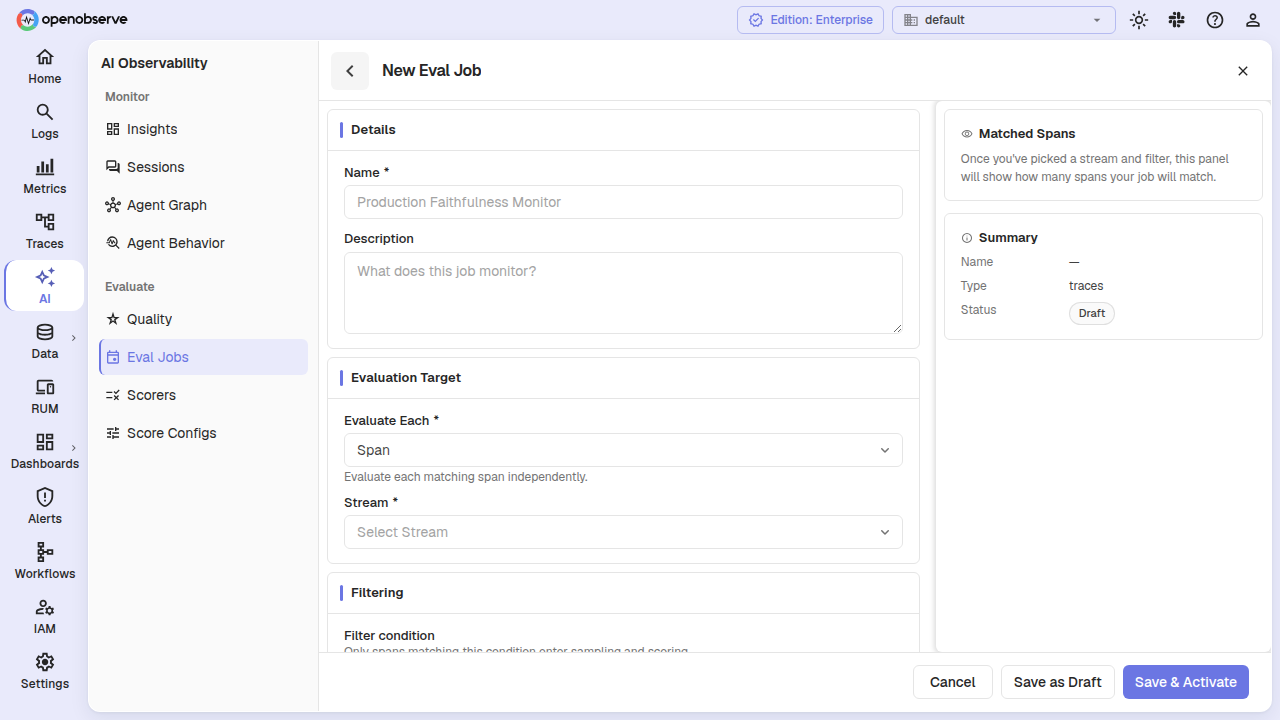
Navigate to Evaluations > Eval Jobs and click Add Job.
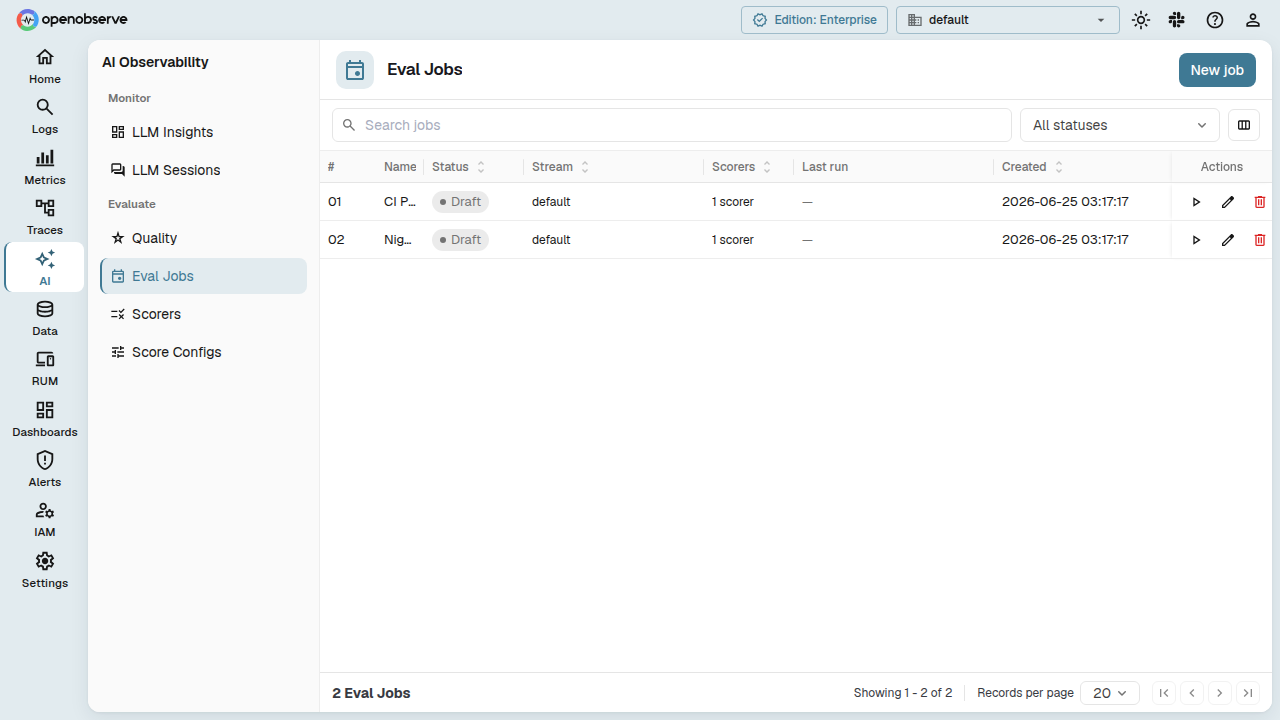
| Field | Description |
|---|---|
| Name | Display name for the job. |
| Description | Optional description. |
| Stream | The trace stream to evaluate. Must be a traces stream. |
| Target Scope | The evaluation granularity: span (score each matching span), trace (score a whole trace once it completes), or session (score an entire conversation session). |
| Filter Condition | A JSON filter expression. Only spans matching this filter are considered. For trace/session scopes, this filter selects which traces or sessions are eligible. |
| Scorers | One or more scorer references (by entity ID). The system evaluates each target against every listed scorer. |
| Input Mapping | Per-scorer mapping of template variables to span attribute paths (e.g., "input": "{{gen_ai_input_messages}}", "output": "{{gen_ai_output_messages}}"). |
| Sampling Mode | all (evaluate everything) or rate (evaluate a percentage, e.g., 0.1 for 10%). |
| Sampling Value | A scalar number (0--1) for rate mode, or null for all mode. |
Target scope
The Target Scope determines what unit of evaluation the job scores:
| Scope | What is evaluated | Completion logic |
|---|---|---|
| Span | Each matching span individually | Evaluated as soon as the span arrives. The system creates a hidden evaluation pipeline that processes spans in real time. |
| Trace | An entire trace aggregated from multiple spans | The scheduler waits for the trace to complete (idle window + optional end signal), then assembles the aggregated payload. |
| Session | A full conversation session spanning multiple traces | Uses session ID columns (session_id, gen_ai_conversation_id, llm_session_id, or gen_ai.conversation.id) to group traces. Completes on idle window or end signal. |
Only span-scope jobs create a hidden evaluation pipeline. Trace and session jobs are detected by the Eval Scheduler, which polls trace streams for completed targets.
Trace and session completion
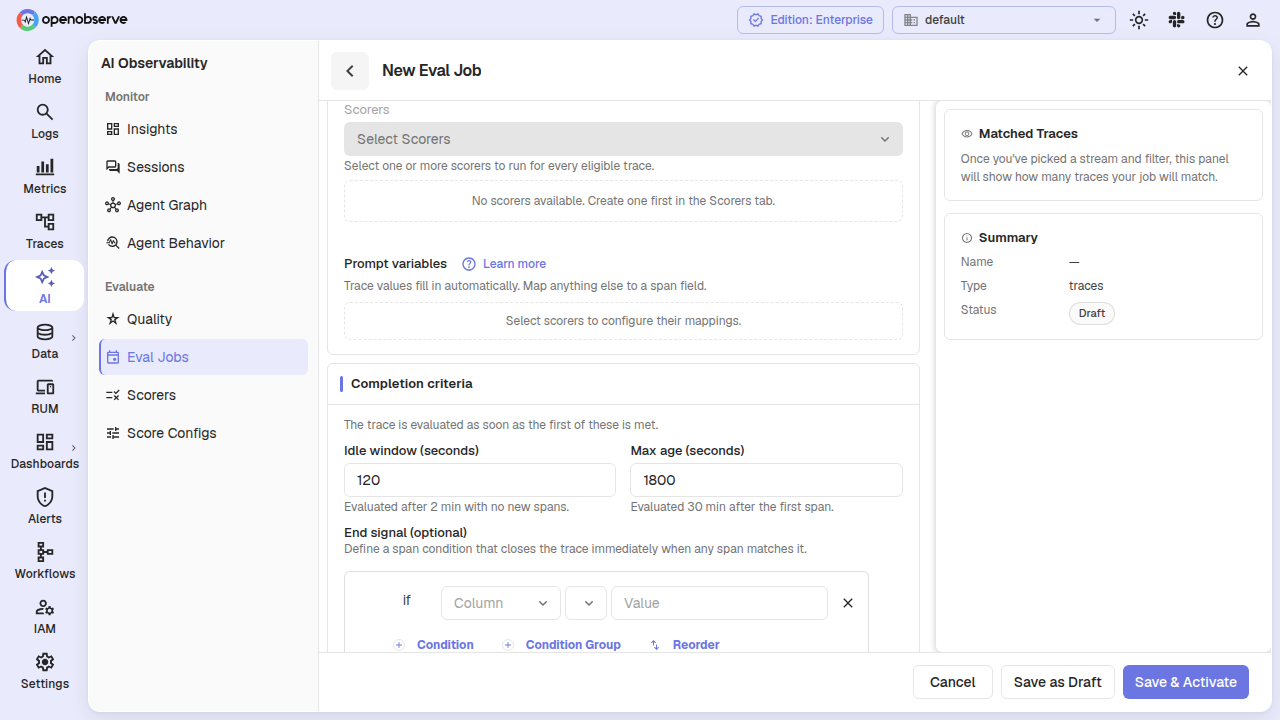
For trace-scope and session-scope jobs, the system must determine when a target is "complete" and ready for scoring. You control this with completion configuration:
| Field | Default | Description |
|---|---|---|
| Idle Window (sec) | 120 (trace) / 120 (session) | Time since the last new span in the target. Once no new spans arrive for this duration, the target is considered complete. Minimum 45 seconds. |
| Max Age (sec) | 1800 (trace) / 14400 (session) | Maximum time to wait for a target to complete. The target is scored after this duration even if spans are still arriving. Must be greater than idle window. |
| End Signal | None (optional) | A filter condition that marks the target as explicitly complete. When the matching span arrives, the target is evaluated immediately without waiting for the idle window. Useful for applications that emit a terminal span (e.g., status = "complete"). |
The end signal is a standard condition expression, using the same filter syntax as the job's main filter condition. For example, to mark a trace complete when a span with status = "complete" arrives:
{
  "version": 2,
  "conditions": {
    "filterType": "group",
    "logicalOperator": "AND",
    "conditions": [{
      "filterType": "condition",
      "column": "status",
      "operator": "=",
      "value": "complete",
      "logicalOperator": "AND"
    }]
  }
}
When an end signal is configured, the target is evaluated when the signal span arrives OR when max age is reached, whichever occurs first.
Span selectors (trace scope)
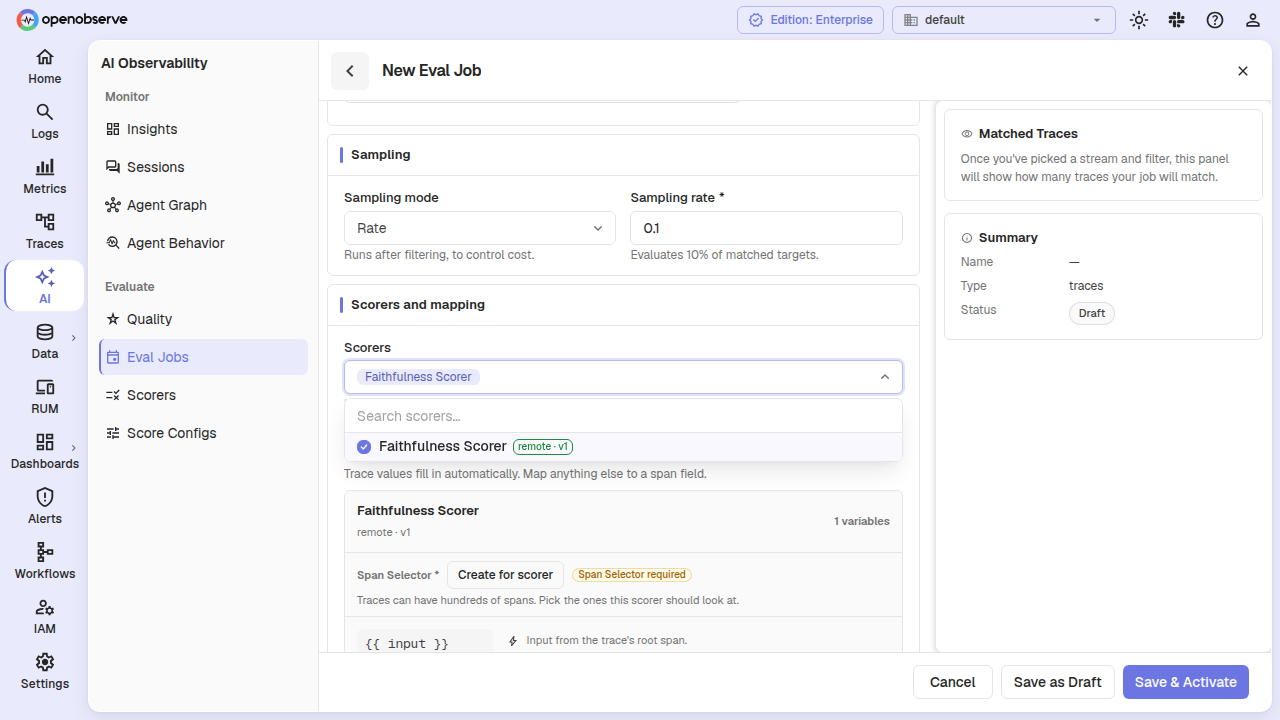
For trace-scope jobs, scorers may need only a subset of the spans in a trace rather than the entire trace. Span Selectors let you define named sub-queries that filter, pick, and limit spans within the trace for each scorer.
A span selector defines:
| Field | Description |
|---|---|
| ID | Unique identifier within the job. |
| Name | Human-readable name (e.g., "tool-call-spans"). |
| Filter Condition | A filter that selects which spans to include from the trace. |
| Field Mode | default (uses a preset list of gen-ai semantic convention fields) or custom (specify your own field list). |
| Fields | (Custom mode) The span attribute columns to include in the payload sent to the scorer. |
| Maximum Spans | The maximum number of matching spans to include (default 5). |
Bind each scorer to a span selector via span selector bindings — a mapping from scorer ID to selector ID. Every scorer in a trace-scope job must have a binding before the job can be activated.
Manual evaluation
You can trigger an evaluation for a specific target on demand, bypassing the automatic sampling and completion logic. This is useful for re-evaluating a trace after changing scorers, or testing a job against a known trace or session.
Send a POST to /api/{org_id}/eval_jobs/{job_id}/manual_eval with:
{
  "targetId": "trace-abc123",
  "traceId": "trace-abc123",
  "sessionId": "session-xyz",
  "variables": { "input": "custom value" },
  "reason": "operator retry after scorer update"
}
The targetId is required. Use traceId or sessionId to pin the evaluation to a specific trace or session. Optional variables override template variables for this evaluation run. The response reports the number of durable evaluation tasks created.
Job lifecycle
Jobs follow a defined state machine:
| Action | Description |
|---|---|
| Activate | Validates the job configuration, applies scope defaults, and starts scoring. For span-scope jobs, creates the underlying evaluation pipeline. For trace/session jobs, registers with the scheduler. Allowed from draft, paused, or degraded. |
| Pause | Temporarily stops evaluation. The pipeline or scheduler registration is preserved. Allowed from active or degraded. |
| Resume | Restarts evaluation from paused or degraded state. |
| Archive | Permanently stops evaluation. The job is retained for audit but no longer processes data. |
Use the action buttons on the job detail page to manage lifecycle transitions.
Update a job
Edit any field on a draft or active job. Updating bumps the job's version. If the job is active, the underlying configuration is automatically reconciled: - Span-scope jobs: the hidden pipeline is updated with new filters, sampling, and scorers. - Trace/session jobs: if switching TO a span scope, a pipeline is created; if switching FROM a span scope, the old pipeline is torn down.
Scoring pipeline
Span-scope jobs create a PipelineKind::Evaluation pipeline behind the scenes. This pipeline is:
- Hidden from the main Pipeline UI — it is managed exclusively by the eval jobs subsystem.
- Coexisting with user pipelines on the same stream (no "one pipeline per stream" conflict).
- Automatically reconciled when the job is updated.
- Terminating at an LLM evaluation task publisher rather than writing to
_llm_scoresdirectly. Durable evaluation tasks are enqueued and processed asynchronously.
Trace-scope and session-scope jobs do NOT create hidden pipelines. Instead, the Eval Scheduler polls trace streams periodically, detects completed targets using the configured idle window and end signal, and publishes evaluation tasks.
Evaluated scores are written to the _llm_scores system stream as LlmScoreRecord entries, and evaluator telemetry (latency, tokens, status) is recorded as OTLP spans in the _evaluator traces stream.
Quality Dashboard
The Quality tab provides a real-time overview of evaluation health across all your score configs, agents, and streams.
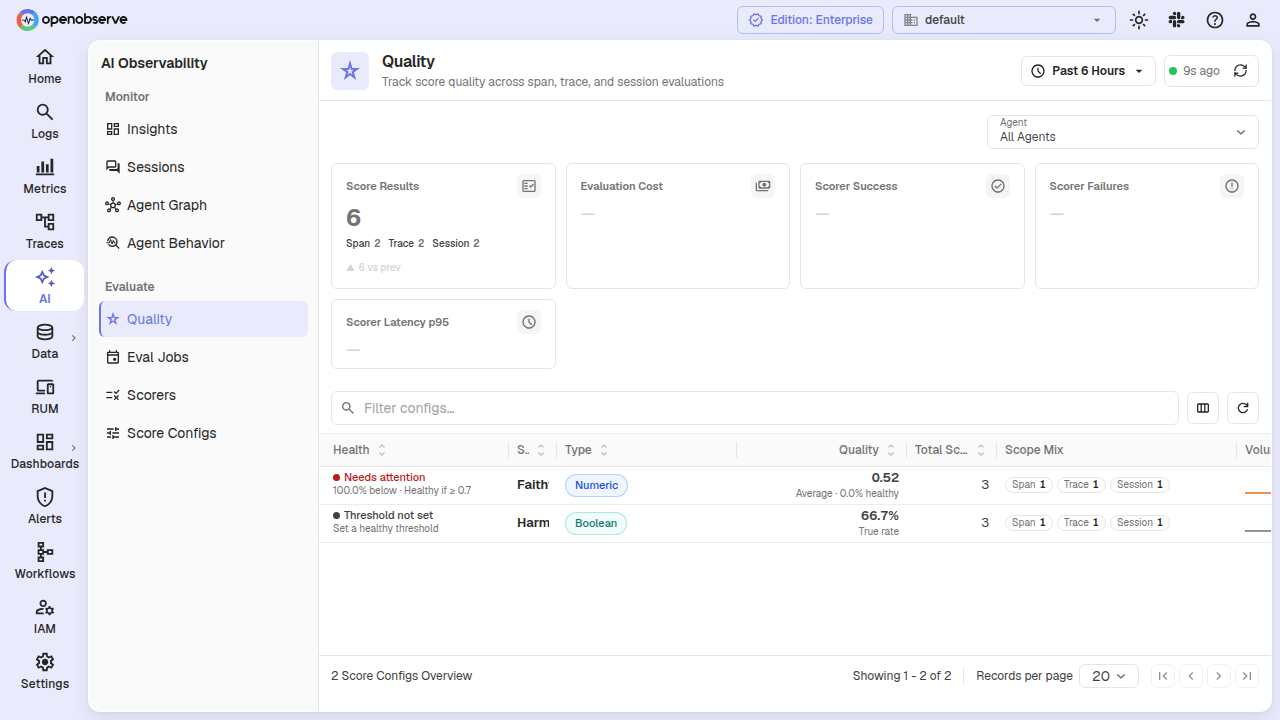
Scope filtering
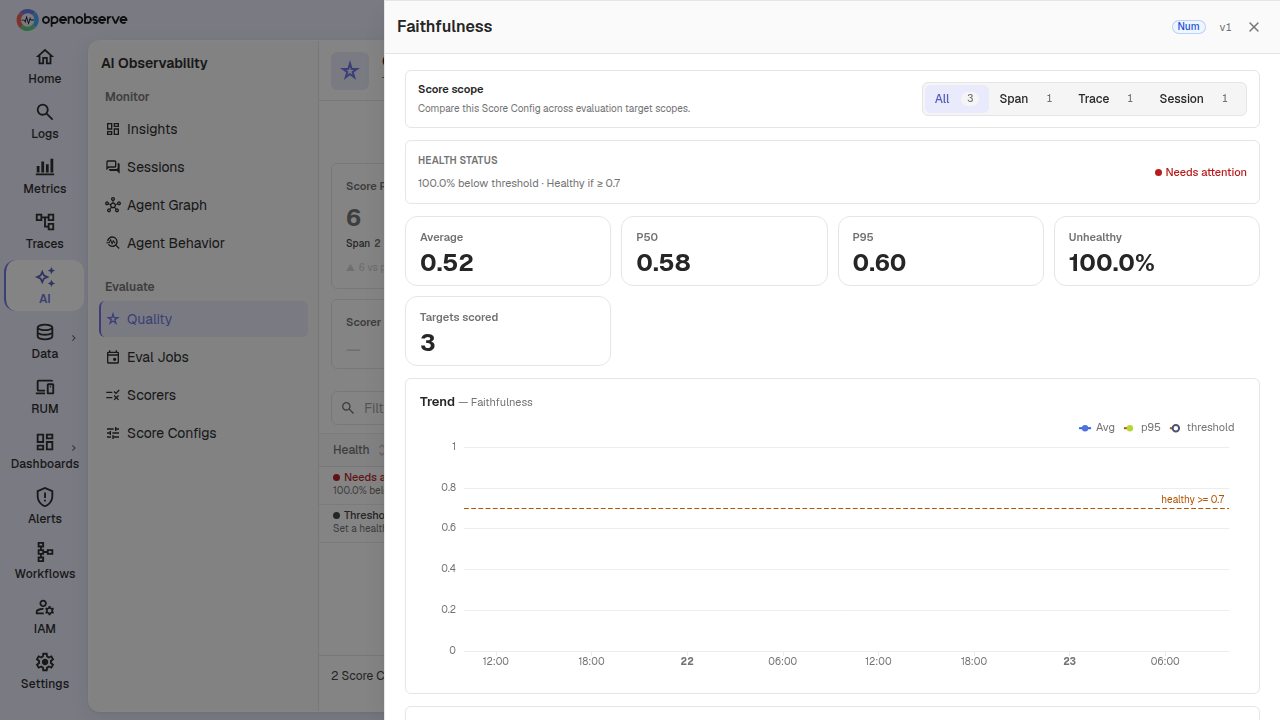
When you drill into a specific score config from the quality page, the detail drawer includes a scope selector that lets you filter KPI cards, trend charts, and the evaluation runs table by target scope: All, Span, Trace, or Session. Switching the scope re-runs all queries within the drawer so you see metrics scoped to the selected granularity.
Evaluation runs
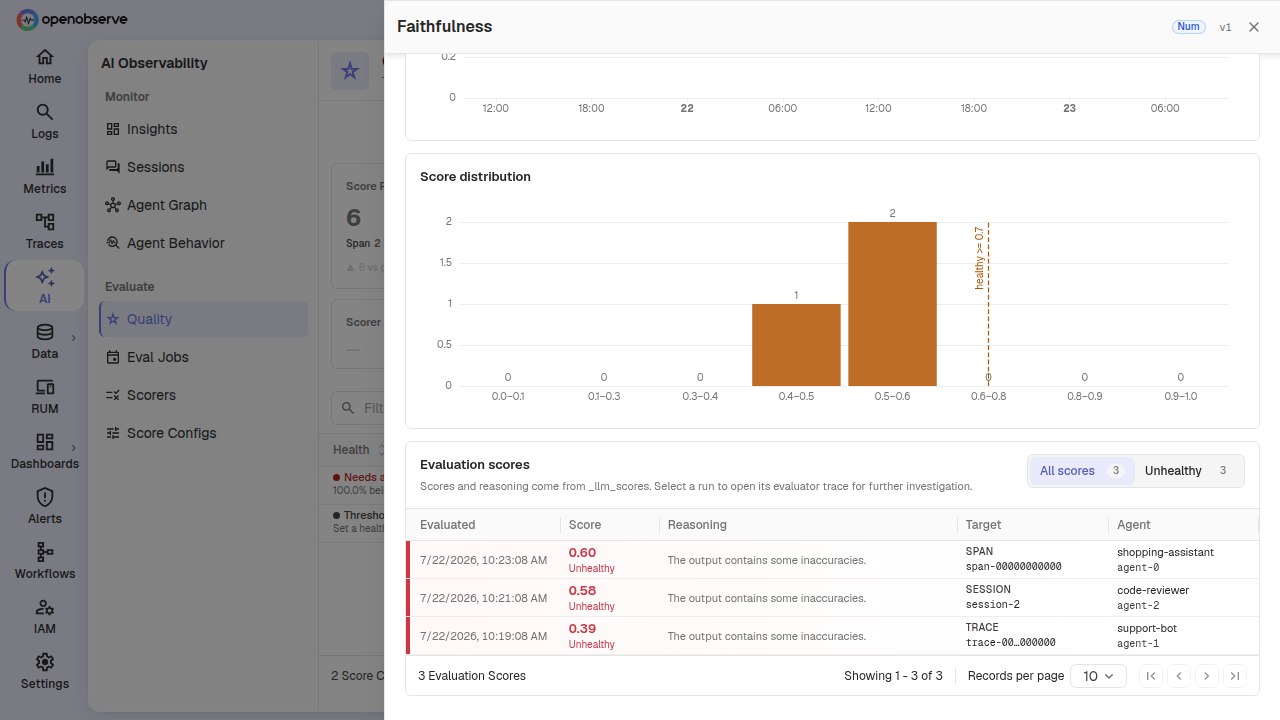
The score config detail drawer includes an Evaluation Runs table that lists individual score records — each row shows the score value (numeric, categorical, or boolean), health classification (healthy/unhealthy), the target identity (scope, trace ID, session ID), agent name, and reasoning if available. Click any row to navigate to the evaluator trace in the _evaluator stream for deeper debugging.
The runs table supports pagination and filtering (all runs or unhealthy only). Scope selector drilling works with the runs table — changing scope narrows the listed runs to only the selected target granularity.
RBAC
Online Evaluations resources have their own OFGA permissions:
| Resource | OFGA Type | Permissions |
|---|---|---|
| Providers | provider |
GET, LIST, POST, PUT, DELETE |
| Score Configs | score_config |
GET, LIST, POST, PUT, DELETE |
| Scorers | scorer |
GET, LIST, POST, PUT, DELETE |
| Eval Jobs | eval_job |
GET, LIST, POST, PUT, DELETE |
Assign the appropriate roles in Identity & Access Management > Roles to control access to evaluation resources.
API Reference
All endpoints are prefixed with /api/{org_id}.
Providers
| Method | Path | Description |
|---|---|---|
GET |
/providers |
List all providers |
POST |
/providers |
Create a provider |
GET |
/providers/{id} |
Get a provider |
PUT |
/providers/{id} |
Update a provider |
DELETE |
/providers/{id} |
Delete a provider |
POST |
/providers/{id}/test |
Test provider connectivity |
Score Configs
| Method | Path | Description |
|---|---|---|
GET |
/score_configs |
List score configs |
POST |
/score_configs |
Create a score config |
GET |
/score_configs/{id} |
Get a score config |
PUT |
/score_configs/{id} |
Update a score config (version bump) |
DELETE |
/score_configs/{id} |
Delete a score config |
GET |
/score_configs/{id}/versions |
List all versions |
Scorers
| Method | Path | Description |
|---|---|---|
GET |
/scorers?scorer_type=llm_judge |
List scorers (optionally filtered by type) |
POST |
/scorers |
Create a scorer |
GET |
/scorers/{id} |
Get a scorer |
PUT |
/scorers/{id} |
Update a scorer (version bump) |
DELETE |
/scorers/{id} |
Delete a scorer |
POST |
/scorers/{id}/test |
Test a scorer with input variables |
GET |
/scorers/{id}/versions |
List all versions |
Eval Jobs
| Method | Path | Description |
|---|---|---|
GET |
/eval_jobs?status=active&scope=trace |
List jobs (optionally filtered by status and target scope) |
POST |
/eval_jobs |
Create a job (draft) |
GET |
/eval_jobs/{id} |
Get a job |
PUT |
/eval_jobs/{id} |
Update a job |
DELETE |
/eval_jobs/{id} |
Delete a job and its pipeline |
POST |
/eval_jobs/{id}/activate |
Activate the job |
POST |
/eval_jobs/{id}/pause |
Pause the job |
POST |
/eval_jobs/{id}/resume |
Resume the job |
POST |
/eval_jobs/{id}/archive |
Archive the job |
POST |
/eval_jobs/{id}/manual_eval |
Trigger evaluation for a specific target |
Create / Update job payload fields (in addition to fields described above):
| Field | Type | Description |
|---|---|---|
targetScope |
"span" | "trace" | "session" |
The target evaluation granularity. Defaults to "span". |
traceConfig |
object | Completion config for trace-scope jobs: idleWindowSecs, maxAgeSecs, endSignal (optional condition). |
sessionConfig |
object | Completion config for session-scope jobs: idleWindowSecs, maxAgeSecs, endSignal (optional condition). |
spanSelectors |
array | (Trace scope only) Named sub-queries that select spans within a trace for each scorer. |
spanSelectorBindings |
object | (Trace scope only) Mapping of scorer IDs to span selector IDs. Required for activation. |
samplingValue |
number | null | A scalar between 0 and 1 for rate mode; null for all mode. |
Super Cluster
In multi-node deployments, evaluation resources are synchronized across the super cluster via dedicated queue topics (eval_provider, eval_score_config, eval_scorer, eval_job). Changes made on any node propagate automatically.